TL;DR: The fastest way to fix a struggling team is to apply proven project management best practices: set clear outcomes, assign clear ownership, prioritize visibly, centralize information, build in accountability, and review continuously — and do it inside a single platform like ClickUp, so nothing lives in scattered spreadsheets, inboxes, and chat threads. Teams that follow these project management best practices on a unified workspace ship projects faster, lose less time to status-chasing, and give leadership a source of truth they can actually trust
6 Proven Project Management Best Practices
Below are the six project management best practices every team — startup, mid-market, or enterprise — should have in place, why each one matters, and how ClickUp (implemented the right way) turns them from good intentions into daily habits.
1. Set Clear Outcomes Before You Set Tasks
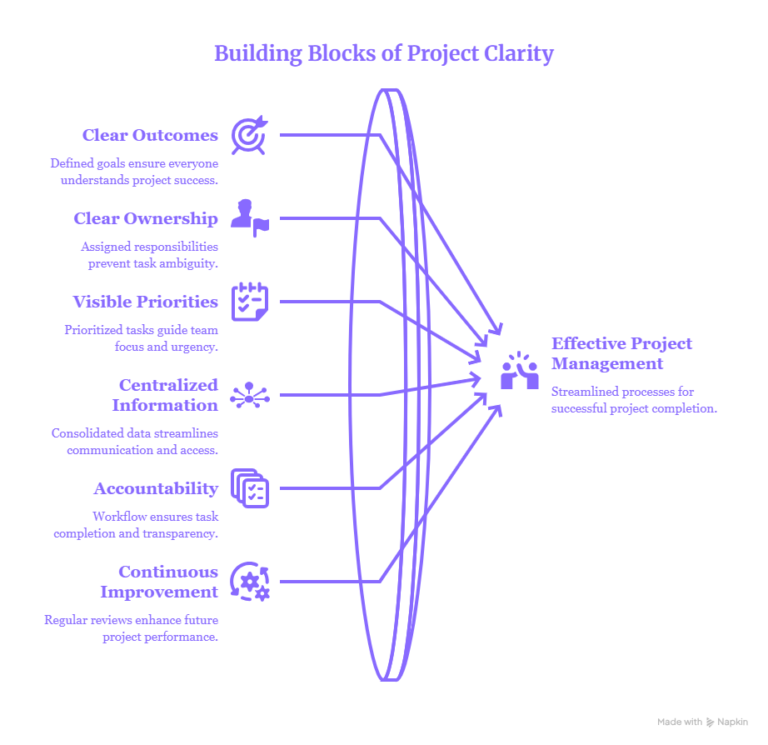
The most common reason projects stall isn’t a lack of effort — it’s a lack of a defined finish line. Defined goals ensure everyone understands what “done” and “successful” actually mean, instead of guessing. This is arguably the foundation of all project management best practices: if the outcome isn’t clear, no amount of task management will save the project.
In ClickUp, this looks like Goals and Targets tied directly to your Spaces and Lists, so every task rolls up to a measurable objective instead of floating on its own.
2. Assign Clear Ownership for Every Task
Ambiguous responsibility is where deadlines quietly die. Assigned ownership prevents the “I thought someone else was handling that” problem that derails timelines. One of the simplest project management best practices to implement — and one of the most overlooked — is making sure every single task has exactly one accountable owner, not a group of watchers.
ClickUp’s Assignees, Watchers, and RACI-style custom fields make ownership visible at a glance, so managers spend less time chasing updates and more time unblocking work.
3. Keep Priorities Visible to the Whole Team
When everything is “urgent,” nothing is. Visible, prioritized tasks guide team focus so people spend their energy on what actually moves the project forward, not just what’s loudest in the group chat. Strong project management best practices always include a shared, visual view of priority — not a priority list that lives only in the project manager’s head.
ClickUp’s Priority flags, Board view, and Gantt charts let teams see what matters most in seconds, across any device.
4. Centralize Information in One Workspace
Consolidated data streamlines communication and eliminates the “which version is correct?” chaos that comes from splitting work across email, spreadsheets, Slack, and five different tools. Centralization is where project management best practices and platform choice intersect directly — this practice is nearly impossible without the right system underneath it.
This is exactly the gap ClickUp is built to close. It replaces 20+ disconnected apps — tasks, docs, chat, dashboards, and reporting — with one workspace, so leadership finally gets a single source of truth and any AI layered on top can see the whole picture instead of fragments.
5. Build Accountability Into the Workflow
A workflow with built-in checkpoints ensures task completion and transparency, rather than relying on managers to manually track down status. Accountability is one of the project management best practices teams say they value most — and the one most often skipped, because it’s harder to enforce without structure.
ClickUp Automations, status workflows, and dashboards make accountability structural instead of personal: tasks move through stages automatically, and overdue or stuck work becomes visible without anyone having to ask.
6. Review and Improve Continuously
Regular reviews enhance future project performance by turning every completed project into a lesson for the next one. Continuous improvement is the project management best practices habit that compounds over time — teams that skip it repeat the same mistakes project after project.
ClickUp Dashboards and reporting views make retrospectives data-driven rather than anecdotal, so teams can see exactly where time was lost and fix it before the next sprint.
Why Most Teams Struggle to Make These Stick — And How Dtech Helps
Knowing project management best practices is easy; making them part of everyday work is harder. ClickUp research found that teams can spend over 60% of their time searching for information and context across workplace communication.
That’s where Dtech Systems can help. With 13+ years of experience, 160+ projects delivered, 17+ startups supported, and an average 25% time saved per client, Dtech brings hands-on experience to ClickUp implementation and project workflow optimization.
Dtech also helps integrate Claude with ClickUp, allowing teams to work with their existing tasks, documents, and operational data while automating repetitive work and generating reports.
The result is more than implementing a tool—it’s turning project management best practices into repeatable workflows your team can actually follow.
Frequently Asked Questions (FAQs)
What are the most important project management best practices?
The most important project management best practices are setting clear outcomes, assigning clear task ownership, keeping priorities visible, centralizing project information, building accountability into the workflow, and reviewing performance continuously. Together, these practices prevent the two biggest causes of project failure: ambiguity and lost information.
How does ClickUp support project management best practices?
ClickUp supports these practices by replacing scattered tools — spreadsheets, email, chat, and separate reporting apps — with one workspace containing tasks, docs, dashboards, automations, and goals. Because everything lives in one place, teams can apply outcome-setting, ownership, prioritization, and accountability without switching between systems, which is the single biggest barrier to consistent execution.
Do I need a consultant to implement project management best practices, or can I do it myself?
You can implement basic practices yourself, but most teams struggle with adoption, not setup — configuring a tool is easy, getting the whole team to actually use it daily is not. Partners like Dtech Systems specialize in this gap: they map your existing workflows, build them into ClickUp, and coach the team live until the new habits stick, which is typically where self-led rollouts fail.

We are a team of experienced software professionals with years in delivering tailored solutions companies. We understand the local market, driving innovation and business success.