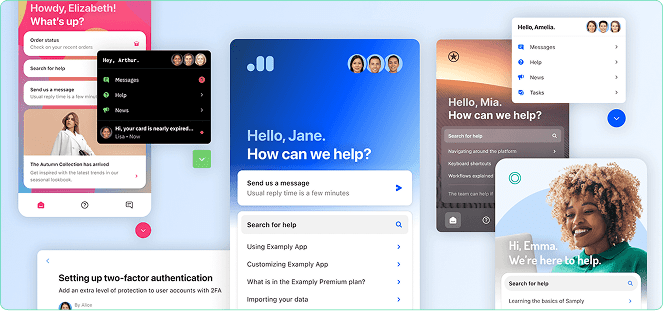
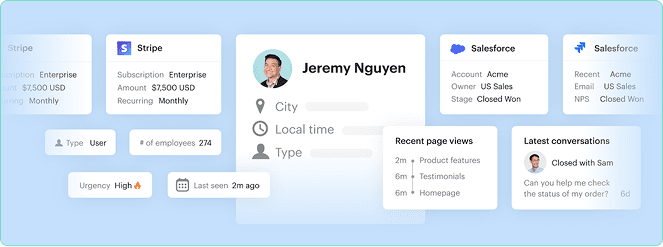
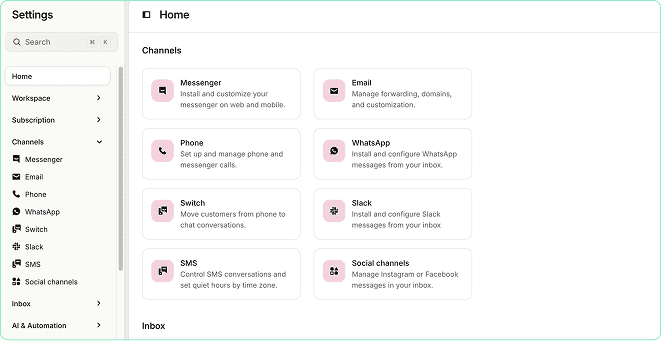
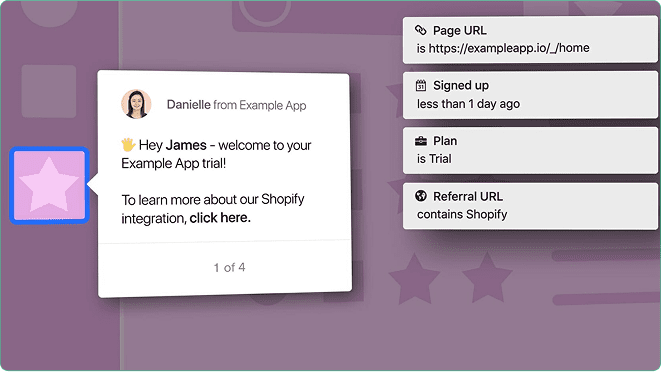
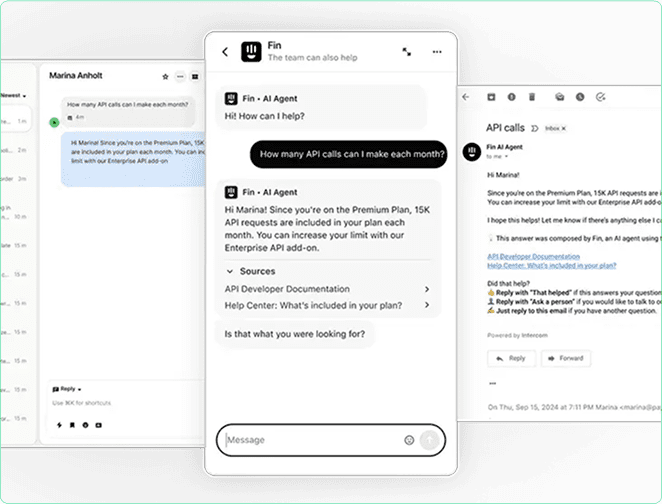
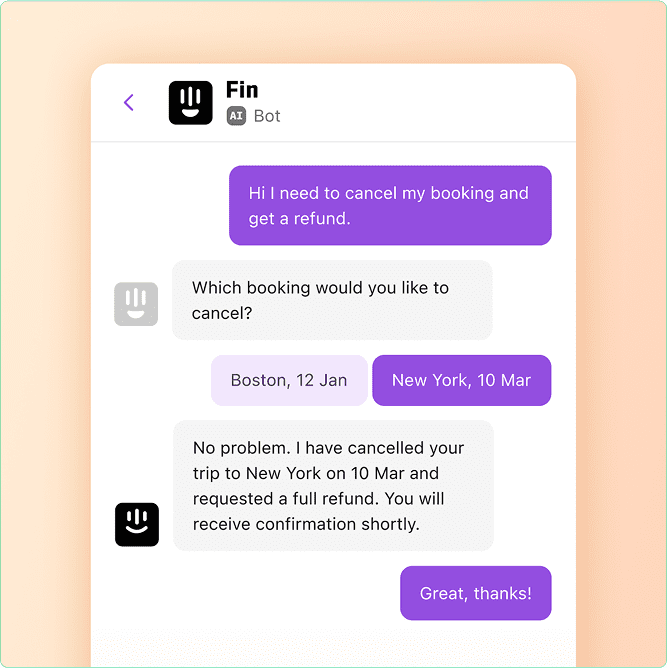
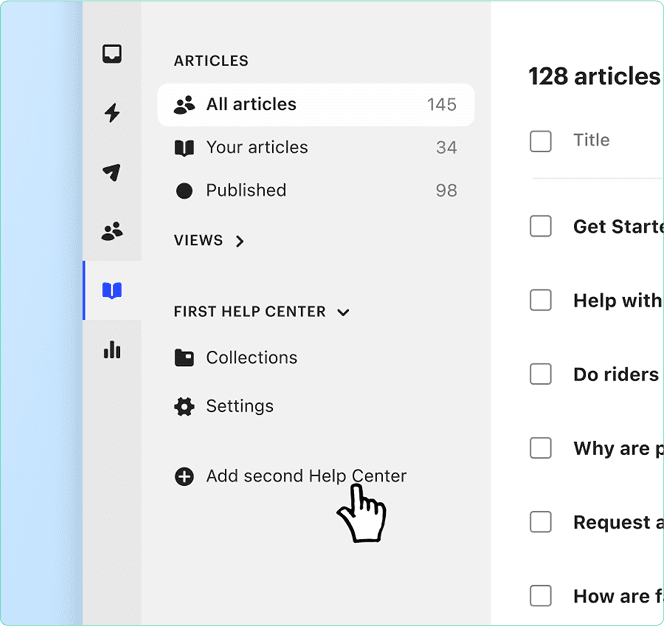
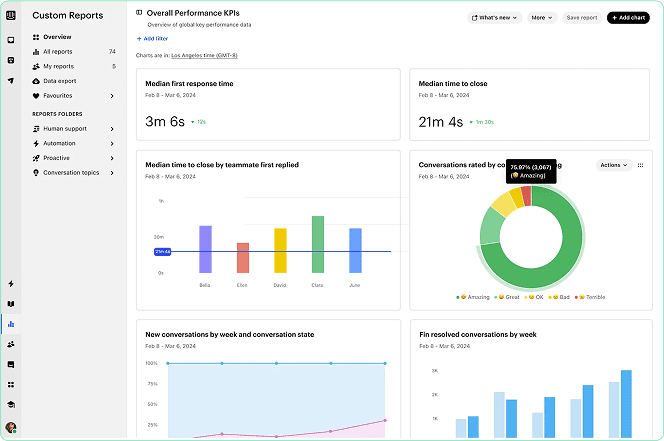
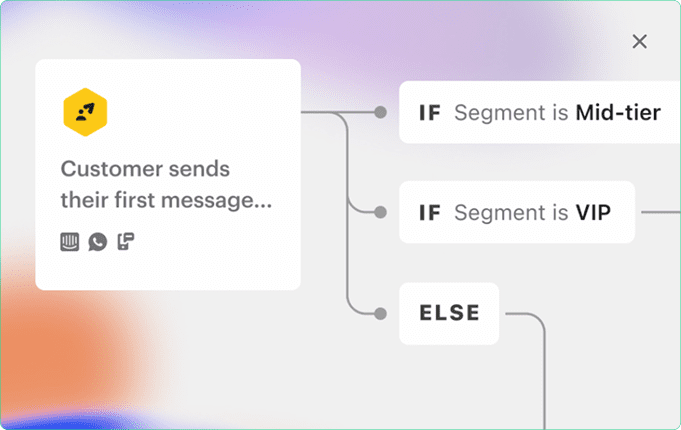
A well-structured knowledge base powers both human and AI support across Help Center, Fin, and Copilot.
Start with customer-first content strategy aligned with business goals.
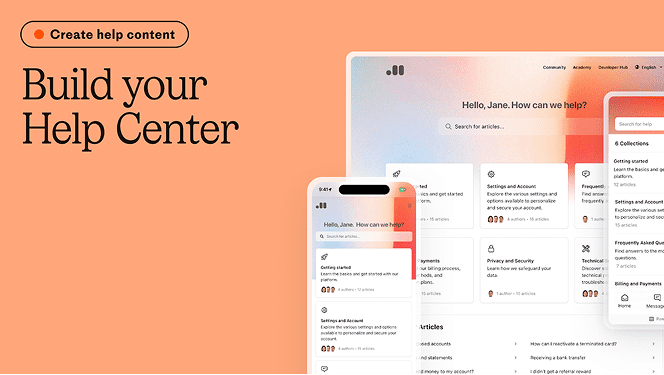
Build intuitive Help Center collections and actionable articles.
Organize content using the Knowledge Hub to fuel AI accuracy.
Personalize AI responses with custom content audiences.
Continuously optimize using performance analytics and AI suggestions.
Step 1: Understand the Dual Role of Support Content
Before writing a single article, recognize that your support content isn’t just for your customers, it’s also for your AI.
Self-serve Help Center: A customer-facing support space, available 24/7.
AI support tools (Fin & Copilot): Behind the scenes assistants that rely on content accuracy and structure to give precise answers.
Support content should be written in a format that humans and AI can both easily understand, clear headers, direct answers, and well-structured formatting.
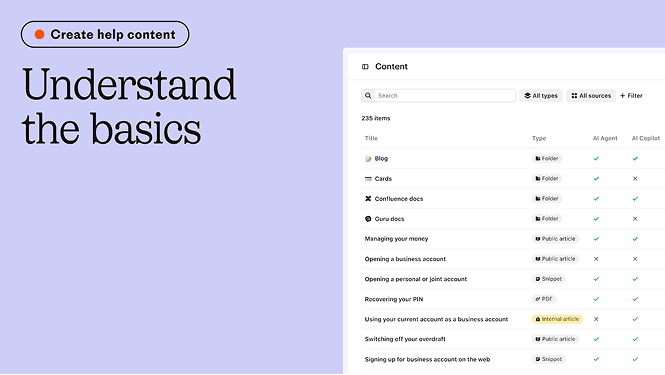
At the center of this is Intercom’s Knowledge Hub a unified content management system that powers all your support channels.
Step 2: Choose the Right Content Strategy
An effective content strategy starts with clarity on your goals and customers.
Your audience: Who are your users, and what are their common questions?
Your goals: Are you trying to reduce support volume, increase product adoption, or improve customer satisfaction?
Your channels: Will the content serve your Help Center only, or also AI agents like Fin and Copilot?
Start with the Help Center once this foundation is solid, it becomes easier to power AI and live support interactions.
Step 3: Build a Help Center for Self-Serve Success
Your Help Center is often the first place customers go to find answers. Make it work for them.
Create Collections
Think of collections as categories (like Billing, Getting Started, or Troubleshooting).
Start with at least 2 collections, each with 3+ articles.
Group them by product area or customer need.
Add Articles
Each article should be an actionable resource, not just text.
Use clear titles and subtitles.
Include headers, callouts, media, and structured layouts.
Make sure every article is assigned to a collection otherwise, it won’t be searchable.
Article Ideas:
Pull from chat history or FAQs.
Ask your support and sales teams what customers struggle with most.
Analyze competitors’ Help Centers.
Step 4: Style and Launch Your Help Center
Your Help Center should feel like an extension of your brand.
Customize it:
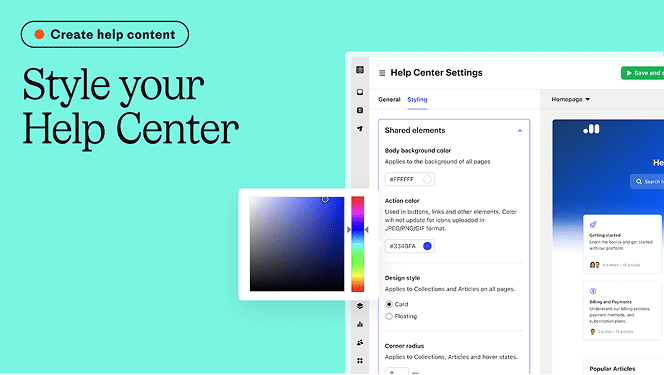
Use the Brand Importer to match your website’s style.
Change colors, fonts, and layout from the settings.
Set a custom domain and footer for professional polish.
Once styled:
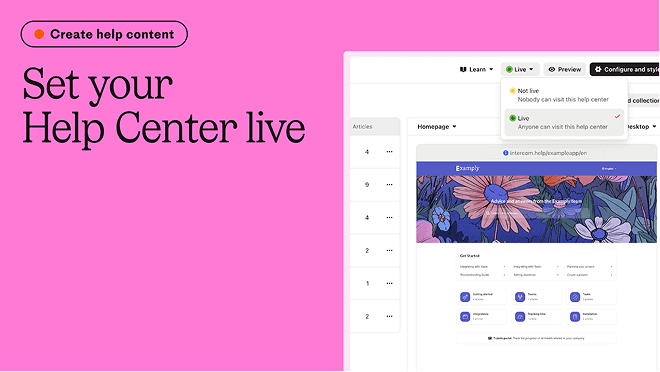
Set it live
Double-check articles are published and assigned to collections.
Click through the site to test usability.
Boost visibility:
Add the Help Center to Intercom Messenger.
Use the Article Inserter App in conversations to share relevant links.
Step 5: Organize the Knowledge Hub for AI Agents
This is where your content turns into smart support.
Your AI agent’s effectiveness is only as good as your content’s structure. So take the time to organize your Knowledge Hub thoughtfully.
What to include:
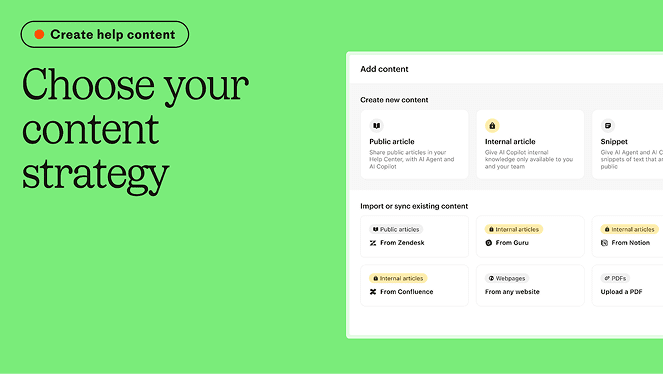
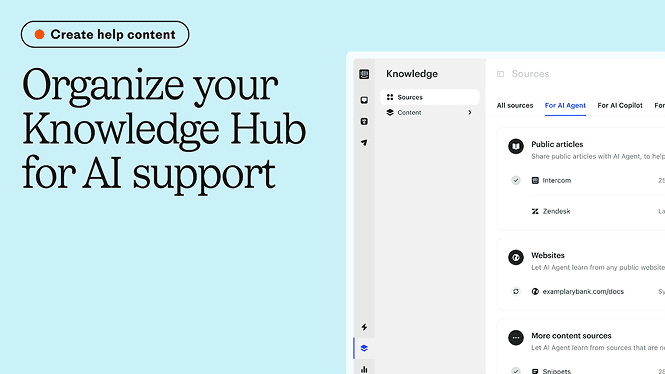
Public articles
Internal-only content
Snippets, PDFs, past chats, and even web links
Folder organization:
Organize by product features or services.
Organize by content owners or departments.
Use content tags to group similar topics and make them easier to update or retrieve.
Step 6: Personalize AI Content by Customer Segments
Want your AI to treat VIPs differently than free users? You can do that.
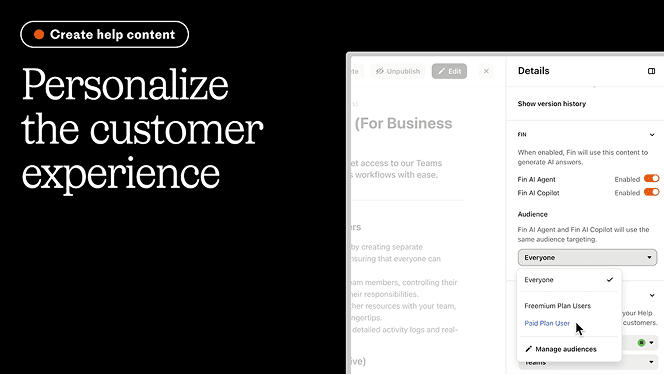
Use Content Audiences:
Define specific user segments.
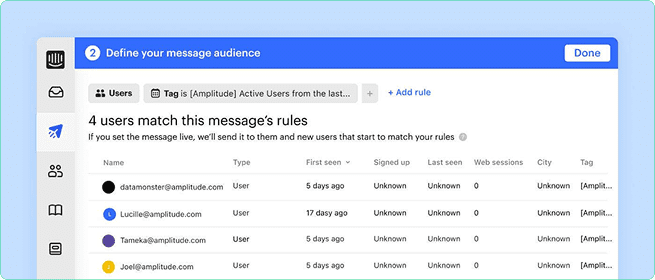
Assign content to each segment so Fin gives targeted responses.
You could have a premium onboarding article visible to all users in the Help Center, but Fin only shares it with paying customers in conversations.
Fin also respects Help Center visibility rules and can further refine responses based on custom audiences for any content type.
Step 7: Monitor, Analyze, and Continuously Optimize
Great content evolves with your product. Keep improving by watching how it performs.
Use Intercom analytics:
Articles Report: See what’s working and what isn’t.
Most viewed articles
Conversations triggered from content
Click on “Microsoft Outlook” to proceed with the setup
Failed searches (content gaps)
AI Suggestions: Get instant advice to rewrite weak content.
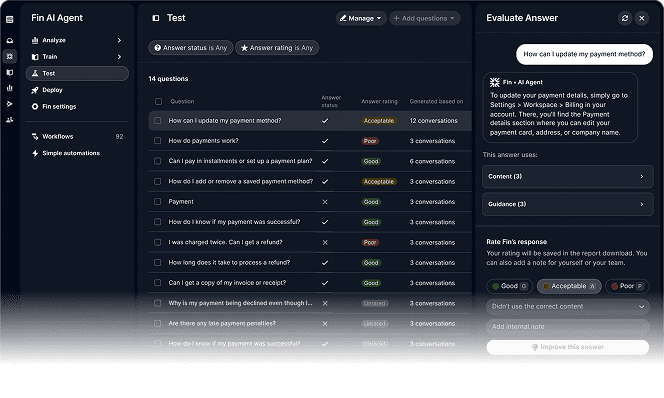
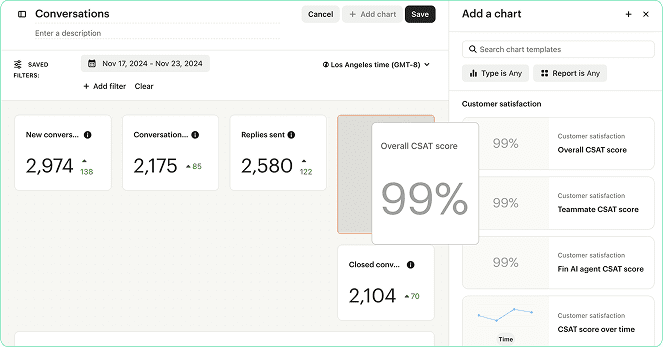
Optimize Dashboard: Track Fin’s resolution rate and understand where it struggles.
Don’t forget to track Copilot performance too, what content it uses and how it helps agents reduce workload.
Final Thoughts
Creating self-serve and AI-ready support content is not a one-time task, it’s a strategy. The more structured, clear, and personalized your knowledge base is, the more powerful your AI tools become.
Whether you’re launching your first Help Center or optimizing for Fin and Copilot, Intercom gives you the tools to build support that scales. Dtech’s Intercom team can get your content, AI agent, and Help Center running with full strategy and implementation.
Intercom supports over 45 languages including Arabic, Urdu, Japanese, French, and Spanish
You can run your Help Center, Messenger, Fin AI Agent, Workflows, and Copilot in multiple languages
Fin can understand the user’s language, find answers in that same language, or translate from fallback content
Real-time translation means you can create one set of content and still support many languages
You can preview how your setup looks and test Fin responses before going live
Reports show how your multilingual support is working in every language
Everything is built into Intercom, no need for extra tools or coding
Step 1: Choose the languages you want to support
Your first step is to tell Intercom which languages your customers speak.
To do this:
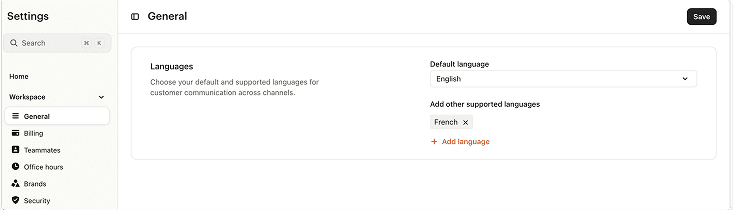
Go to Settings → Workspace → General → Languages
Here, you will set your main language, like English, and then add other languages such as Arabic, Urdu, French, or Chinese. Once selected, Intercom will automatically recognize the user’s browser settings and show Messenger and Help Center in the language that matches.
Step 2: Turn on multilingual support in your Help Center
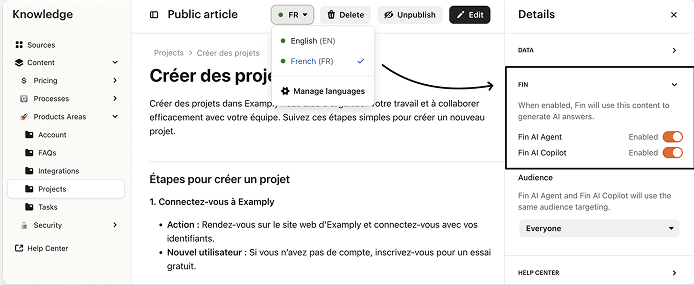
Your Help Center is visited by users to read helpful articles. To make sure everyone can understand them, you need to activate the Help Center for multiple languages.
Here’s how:
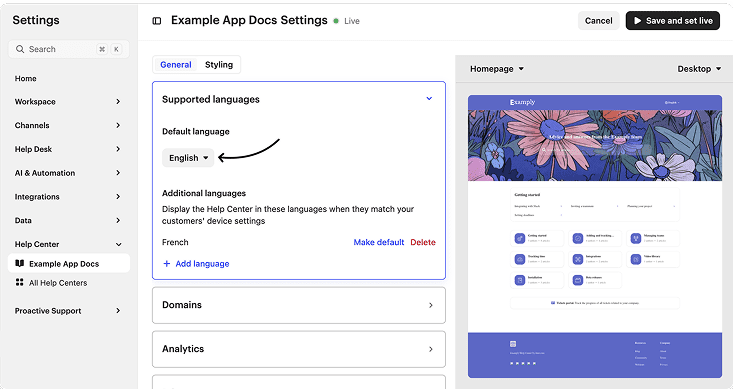
Go to Help Center → Open Settings → Choose Languages
Now you can add more languages and write articles in each one. For example, you can have the same article in both English and French, and Intercom will show the right version to the right person. You don’t need separate websites or accounts, just add your translations to the same article.
Step 3: Train Fin AI Agent to work in multiple languages
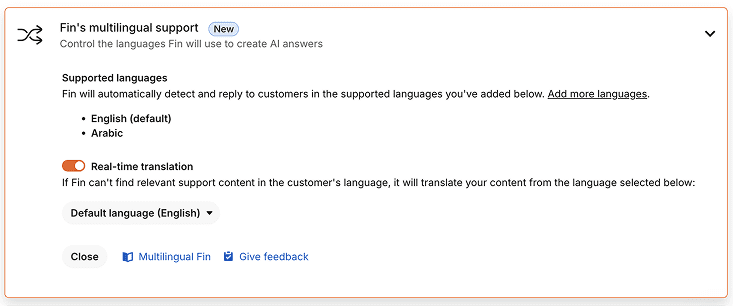
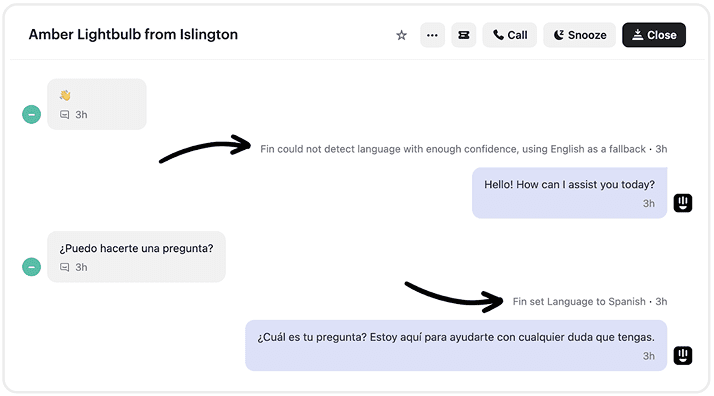
Fin AI Agent can understand and respond in over 45 different languages. This means your users can type a question in their own language, and Fin will either find an answer written in that same language or translate the response if needed.
Here’s how Fin handles multilingual conversations:
It first checks the language of the customer’s question
Then it searches for matching content in that language
If a match is found, it replies using that content
If not, it can translate fallback content into the customer’s language
To enable this:
Go to Fin AI Agent → Fin Settings → Multilingual Support → Select your supported languages
Step 4: Use real-time translation if content is missing
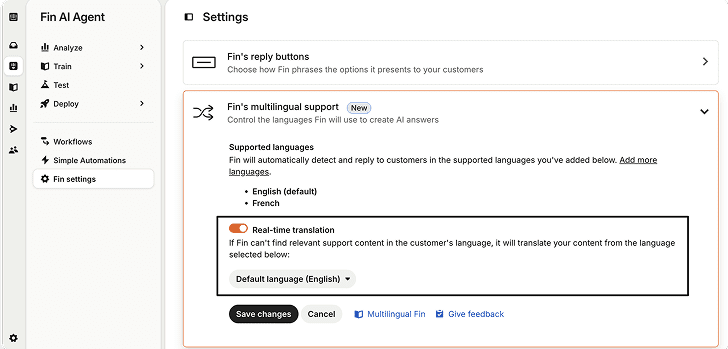
If you do not have content in every language, Fin can still help using real-time translation. This means that even if your Help Center articles or snippets exist only in one language, Fin can translate the answer before replying to the user.
To enable real-time translation:
Go to Fin AI Agent → Fin Settings → Multilingual Support → Turn on Real-time Translation
Once this is enabled, Fin can translate any answer and respond in the customer’s language, making the experience smoother without extra work from your team.
Step 5: Build smart workflows for different languages
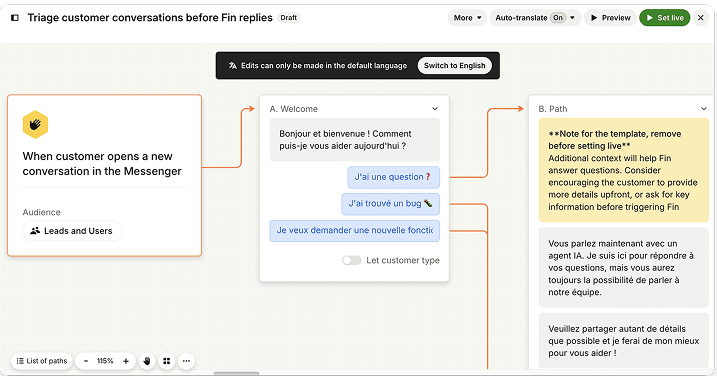
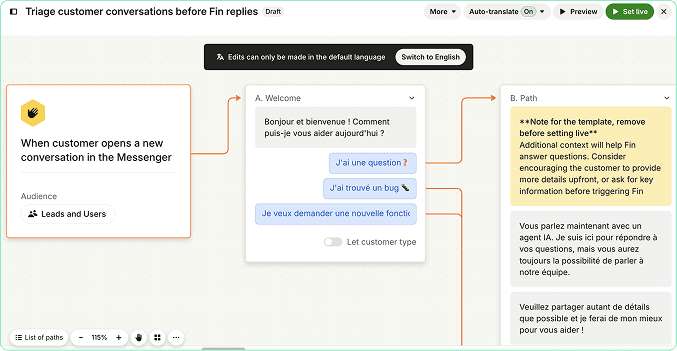
Workflows help you automate conversations by guiding users through answers, forms, or questions. You can set up workflows that change based on the user’s language.
To build this:
Go to Automation → Workflows → Create a new Workflow
Inside the workflow, you can add conditions like:
If the user’s browser language is French, show the French flow
If the user’s language is Arabic, show the Arabic path
Use the Let Fin Answer step in each path to answer questions in that specific language
This setup allows your automation to feel more human, showing buttons, replies, and guidance in the exact language the customer expects.
Step 6: Improve Messenger with multilingual experiences
The new Intercom Messenger is faster and better for global users. It automatically matches the customer’s language and displays everything in a familiar way.
Once languages are selected in your workspace settings, the Messenger will show its interface in the user’s language & display welcome messages in their language
You don’t need to create separate widgets or setups. Everything happens in the same Messenger, just smarter.
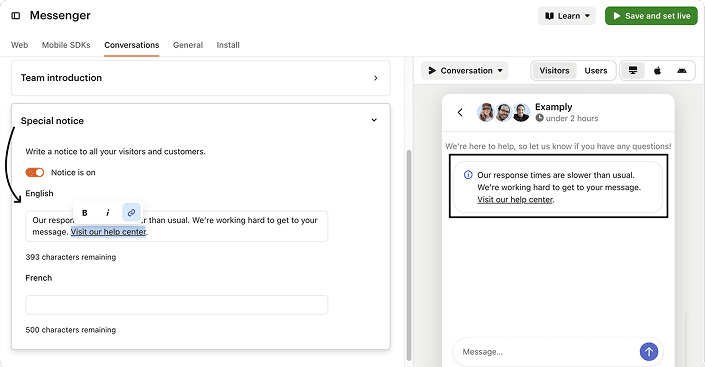
Step 7: Show special notices in multiple languages
Sometimes you want to inform your users about special updates, like a holiday, a system issue, or a change in support hours. You can use special notices for this.
To show them in different languages:
Go to Messenger → Proactive Support → Special Notices
Write different versions of your message in each language, and set the rule to show the correct version to the right audience. For example:
Users with their language set to Arabic will see the Arabic notice
Users browsing in Spanish will see the Spanish version
This ensures clear communication with everyone, even when you’re not available live.
Step 8: Use Copilot to help your team respond in different languages
Copilot helps your support agents by suggesting helpful replies based on your content. It can now support multiple languages too.
To set this up:
Make sure your multilingual content is available and tagged for Copilot use
Activate Copilot inside your Inbox settings
Copilot will detect the language of the user’s question and suggest replies in the same language
This saves time for your team and keeps the conversation consistent and accurate, no matter who is replying.
Step 9: Preview and monitor performance by language
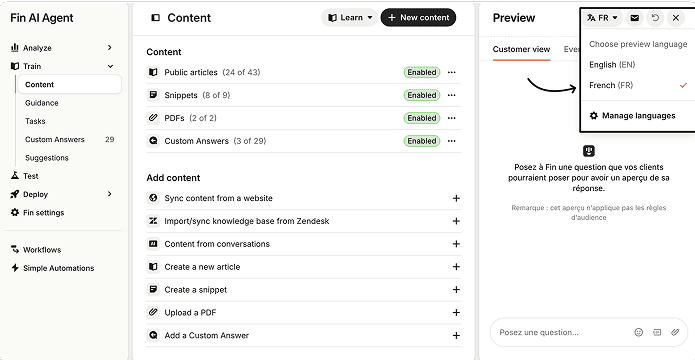
Before going live, you can test how Fin responds in different languages using the preview tool.
Ask questions in that language to see how Fin replies. You’ll see test conversations appear in your Inbox under the name Preview user, so your team can also review them.
After going live, you can keep track of performance by filtering conversations and reports.
To check how things are going:
In your Inbox, create views filtered by language and Fin involved
In your Reports, open the Fin AI Agent report
Click Add Filter → Choose Language
Review how Fin performs in each language and see which ones might need better content
This helps you keep your support quality high in every region and improve where needed.
Wrap-up
Intercom makes it easy to give support in different languages without building different systems for every region. Whether you’re working with users from Asia, Europe, or the Middle East, you can guide them clearly, answer their questions, and offer help in the language they understand best.
By using Fin AI Agent, smart Workflows, real-time translation, and language-based custom messages, you create a support experience that feels personal and respectful. And with Copilot and Messenger also working in multiple languages, your team stays efficient without extra effort.
Multilingual support is no longer a luxury. It’s the new standard. And with Intercom, it’s easier than ever to do it well.
If you need help setting this up, our team is ready to walk you through every step.
Time-zone mismatches – Customers reach out at any time; support teams can’t always keep up.
Overloaded inboxes – Questions flood in from emails, live chat, and social media DMs; too many conversations, too little time.
Generic interactions – Everyone is greeted with the same “How can we help you today?” message, over and over again.
What makes this even more concerning is that customer service has evolved into a means of distinguishing your brand, rather than merely supporting it.
Take a look at the top 5 companies in Forbes’ Best Customer Service 2025 list. You’ll notice they all operate primarily in-person, where relationships can be easily formed.
So, online businesses face a steep climb.
But we’re here to tell you they might actually have an edge. Because customer experience can be optimized to work even better digitally.
And the right tool can make a world of a difference.
Enter Intercom
Intercom is an all-in-one customer service platform built specifically for the online world. From onboarding to support to engagement, it gives businesses the tools they need to create quick and meaningful customer experiences.
Key Takeaways
Intercom speeds up response times with automation and AI support.
It consolidates messages across channels into one unified inbox.
It reduces customer service costs through smart automation.
It improves onboarding experiences with interactive product tours.
It enables personalized messaging at scale using customer data.
Here are just a few of the most common problems Intercom helps solve.
Slow Customer Response Times
It’s easy to see why online businesses may struggle with speed. Without a front-desk team operating in-person, everything happens through screens and an overwhelmed support team.
When the same team is handling repetitive questions day in and day out, response times inevitably slow down. And in today’s fast-paced world, slow responses are costly. You risk losing not just customer interest, but customer trust and revenue too. It’s a domino effect most businesses can’t afford.
With live chat and AI-powered bots, Intercom provides real-time support around the clock. By automating common and repetitive queries, your human agents can focus on the high-value conversations, the ones that really build relationships.
In fact, Intercom’s AI agent FIN resolves an average of 57% of customer queries on its own. That’s more than half the workload gone.
Now you get happier customers and a support team that dedicates their time to deliver quality experiences instead of the same old answers.
Scattered Conversations Across Platforms
To deliver robust support, online businesses need to be present on multiple communication channels. It’s complicated but necessary to maximize their reach. But it comes at a cost.
With messages coming from every direction—email, website, social media—support teams end up juggling scattered conversations. Messages are missed. Others fall through the cracks. A few are just left unopened.
Instead of limiting where your customers can reach you, the smarter move would be to improve how these channels are managed. Intercom solves this with a unified inbox with centralized ticketing that allows for consistent support.
Whether it’s Instagram DMs, WhatsApp messages, emails, or even Facebook chats, you can see and respond to everything from one place. This reduces platform fatigue and ensures your support can run smoothly.
High Support Costs
Great support doesn’t come cheap. Whether it’s hiring and training personnel or setting up automations across different platforms, the costs quickly pile up.
Many existing support systems also lack integration, forcing teams to handle multiple tools and lose time performing redundant tasks.
Intercom fixes that easily. With built-in AI, automations, and deep integrations, it reduces the need for extra staff and manual work.
Tasks like routing tickets, answering common queries, and updating customer records can be handled automatically, all at a cost compatible with your business.
Poor Onboarding for New Customers
The minute a visitor lands on your site, you’re already making an impression. In-person businesses have an edge in guiding customers through every step of their visit with real-time help. But what if we told you online businesses could do the same?
Intercom offers the unique feature of Product Tours. With this, you can onboard new customers by guiding them through your website or app, with conversations, messages, and bots.
Imagine this: you’re a prospective customer visiting a SaaS website for the first time. You’re curious but overwhelmed, struggling to know what to click or look at first. Just as you’re about to leave the site, a pop-up appears, guiding you step-by-step through their key offerings. It’s like a personalized tour, telling you everything to the point.
It’s both user-friendly and proactive. And it helps businesses engage, educate, and convince new customers before they can even ask for help.
Lack of Personalized Communication
This might just be the biggest challenge online businesses face: a massive gap in personalized communication. And to be fair, it is hard. As businesses scale, while also being online, tailoring every interaction becomes increasingly difficult.
Intercom knows this better than anyone. By tracking user behavior and understanding who your customers are, they help you send highly personalized messages, automatically. You can trigger specific messages based on demographics, lifecycle stages, past actions, and even custom filters.
There’s no end to the customizations or your support. No two conversations feel the same and your messaging can project exactly what your business aims to do, all while maintaining the human aspect in interactions.
Conclusion: Intercom Can Do It All
Your online business deserves more than just imperfect solutions to customer service. While the gap between online and in-person experiences may seem endless, it can be overcome with the right tools and the right attitude.
Intercom brings it all together: better support, faster responses, and personalized experiences.
If you want to let your customers know that you truly care and want to deliver the best experience imaginable, Dtech Systems can help you make it happen.
Book a free consultation with us today and we’ll take care of the rest.
Intercom supports SaaS, e-commerce, EdTech, healthcare, and more
Combines AI, automation, and human support to resolve conversations faster
Helps companies improve onboarding, reduce churn, and increase satisfaction
Real companies like Atlassian and Outschool use Intercom at scale
Works for startups and enterprises alike, even without developer resources
Who Uses Intercom
SaaS (Software-as-a-Service) Companies
For SaaS companies, the onboarding and support experience can make or break their brand. Everything happens online, whether it’s onboarding users, handling support, or product upgrades. But managing all that at scale while keeping churn low, especially with free trials, can be overwhelming.
Intercom helps SaaS teams bridge that gap and improve onboarding by making engagement quick and personal.
How Intercom Helps:
Product Tours: Walk new users through your software to speed up onboarding and increase activation.
Bots & Automations: Handle repetitive questions instantly, with timely human handoff when necessary.
Unified Inbox: Manage all conversations in one place, with full context and AI assistance.
With Intercom, support teams work smarter. Customers are onboarded with no delays, queries are handled efficiently, and your team can finally focus on building relationships, not just answering tickets.
Atlassian, the Australian software giant, uses Intercom to connect with their customers, allowing them to manage 1400+ monthly conversations all while maintaining their first-response time of under three minutes.
E-Commerce Companies
Retailers depend on real-time customer support and innovative strategies of engaging customers to boost sales. But managing an influx of support tickets while trying to grow your platform is no easy task.
Intercom helps e-commerce brands assist customers with product and checkout questions, leading to higher conversions and better customer satisfaction.
How Intercom Helps:
Live Chat: Resolve customer queries instantly with AI-powered live chat and help articles.
Triggered Messages: Offer assistance or discounts when users stall at checkout.
Product Recommendation: Recommend products based on browsing and purchase history with bots.
E-commerce brands integrate Intercom seamlessly into their storefront, creating a smooth shopping experience from their first click to the final checkout.
EdTech Companies
Great support in EdTech means understanding your target users: students, instructors, and administrators.
Intercom lets you guide and support users in a way that feels personal and intuitive.
How Intercom Helps:
Platform Navigation: Help new users navigate your platform with in-app walkthroughs.
Targeted Nudges: Send timely nudges to keep students on track.
Feedback Collection: Gather student feedback to ensure courses always remain relevant and engaging.
From login to feedback, Intercom helps EdTech platforms create supportive learning environments at scale.
Outschool, a US-based education platform, scaled its support with Intercom during the pandemic. This allowed them to meet customer expectations while managing a larger ticket volume, allowing for high-quality, consistent service.
Healthcare & Wellness Companies
Managing high volumes of common questions, following up on appointments and onboarding patients while complying with data regulations is always a challenge with digital healthcare platforms.
With Intercom, it’s easier than ever to deliver fast, personalized care while staying fully compliant with regulations like HIPAA.
How Intercom Helps:
Secure Chat: Keep patients’ data safe and secure with Intercom’s robust security practices.
Follow-up Messages: Manage patient follow-ups through automated messages and human supervision.
Effortless Integration: Integrate Intercom with EHRs or appointment platforms for a well-rounded support center.
It’s easy to let support slip when the systems are too complex but Intercom simplifies it all while ensuring your healthcare platform is bigger, better, and more secure than ever.
Dental Intelligence, a space designed for dental teams to manage their work better, use Intercom to automate routine tasks, enabling their team to manage conversations more efficiently while improving patient outcomes.
FinTech, Real Estate, Travel, and More
Industries like FinTech, real estate, and travel also turn to Intercom for their support. Whether you’re routing queries based on urgency, helping users compare listings, or pushing travel alerts in real-time, Intercom helps you stay proactive and personal.
With features like customized workflows, sentiment-based routing and powerful integrations, you can easily tailor your support to fit to your business needs.
Intercom Works for Businesses of All Sizes
If you don’t have a full-time support team or developer, Intercom’s easy-to-use tools make it simple to get started.
Start small, scale fast – Intercom grows with you with its range of packages.
No dev team? No problem – Drag-and-drop bots and prebuilt workflows make setup simple.
Cost-effective – Flexible plans that work for startups and scale-ups alike.
Unified view – See every customer’s history, behavior, and messages in one place.
Intercom supports businesses across industries — from highly regulated sectors like Finance and FinTech to dynamic spaces like eCommerce, EdTech, and eGaming. Its flexibility and power make it the go-to solution for companies with unique support needs, no matter their stage or scale.
Ready to make Intercom work for you?
At Dtech Systems, we help businesses get the most out of Intercom. Whether you’re overwhelmed by customer conversations or wanting to improve response times, our experts can guide you every step of the way.
Contact us today to learn how we can optimize Intercom with your current setup!
Support agents play a vital role in bridging the gap between businesses and their customers.
A well-organized Inbox and powerful filters help agents start their day with clarity and focus.
Ticket sorting is streamlined through categories, tags, and smart routing, before a human even steps in.
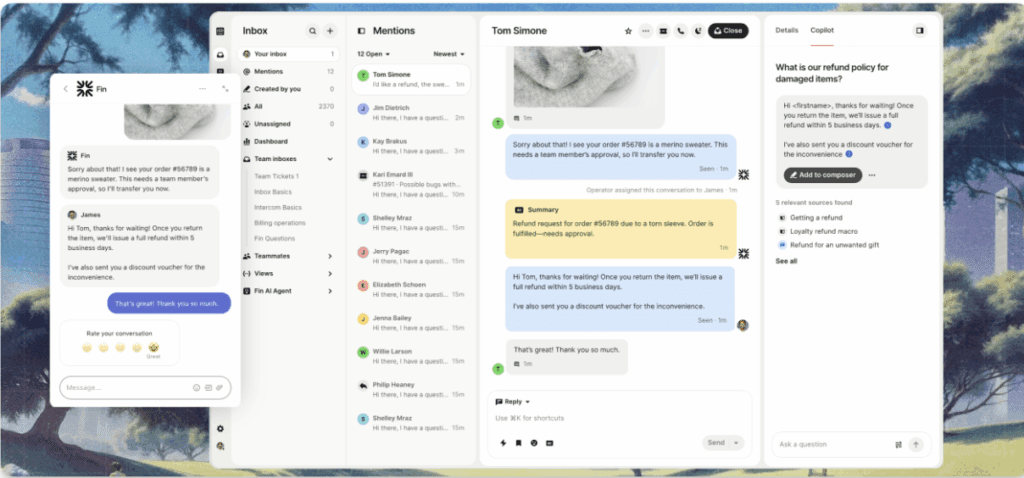
Seamless, context-rich customer conversations are powered by Intercom Messenger and AI tools.
Internal collaboration tools like mentions and team assignment features keep support efforts aligned.
Automations reduce manual work, letting agents focus on the interactions that matter most.
Built-in analytics and performance metrics help agents continuously improve and spot areas for growth.
Small daily habits like time-blocking, trend reviews, and proactive personalization separate good agents from great ones.
With the right tools, support teams can become efficient, scalable, and truly customer-first.
A Day in the Life of a Support Agent
A typical day in support working with Intercom looks like this:
Starting the Day with the Inbox
Everyone dreads Mondays: it’s the day when you grudgingly return to work and reorganize your tasks.
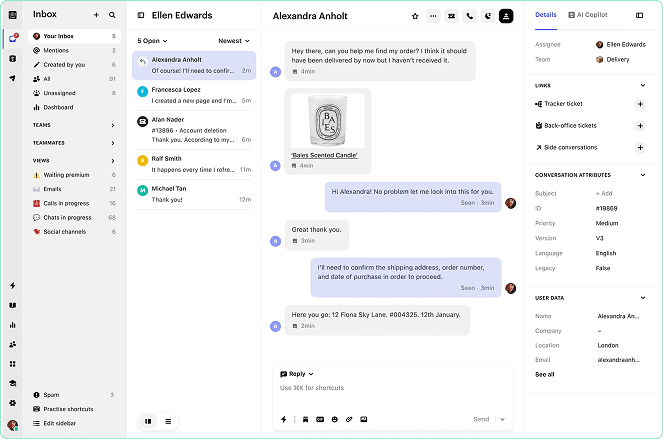
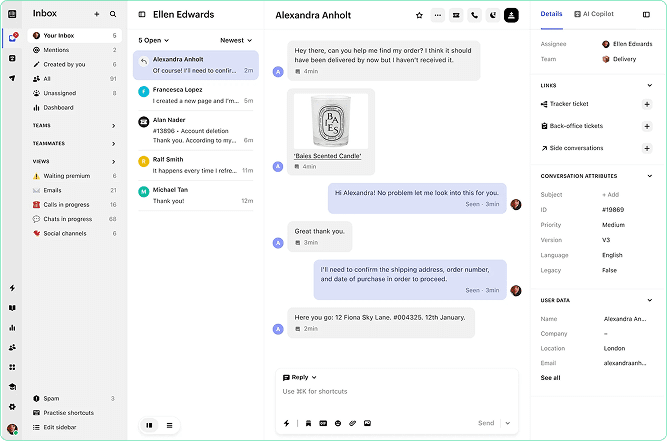
With Intercom, your day starts in the Inbox, where everything you need is just a click away. No need to jump tabs; your conversations, tools, and customer data are all in one place.
You can prioritize conversations using filters and tags, while the sidebar provides quick access to customer history and recent activity.
Even better? You have an AI assistant to help you navigate the chaos and craft quick but precise responses.
Sorting Work through Tickets
When tickets come pouring in, especially at a larger company that’s active across multiple platforms, keeping track becomes a challenge.
Intercom’s many categorization features allow you to sort tickets by severity, topic, or customer type, making it easier to prioritize what needs your attention.
Tags like #FIN and #urgent give you a quick read on the nature of a ticket, helping you work efficiently. And thanks to Intercom’s AI chatbot, FIN, tickets that can be resolved automatically are tagged and closed before you even see them.
Additionally, the right team members get the right tickets through automatic routing. You can also see if someone’s already handling a ticket, avoiding any confusion.
Interacting with Customers
One of the most important parts of the job? Talking to customers.
This happens effortlessly through Intercom Messenger, whether it’s on your company’s website, email, or mobile.
You can use saved replies or even AI to speed up responses. But more importantly, having access to customer details like past interactions and ratings helps you adjust the tone of the interaction and build stronger connections.
Collaborating with Others
Support isn’t a solo effort. Like any role, whether you’re leading a team or sharing findings across departments, collaboration is a necessity.
Agents often work in teams, assigning conversations to each other based on expertise or workload. With mentions, it’s easy to flag messages or keep others in the loop, making for smooth, aligned support.
Setting Up Automations
Support agents are also responsible for improving efficiency, with automation changing the game.
With well-designed automations, repetitive tasks are taken care of so you can focus on the important conversations.
FIN AI automatically handles FAQs, while custom workflows route conversations, send targeted messages, or hand over for human support.
Improving Support
Staying proactive is hard but necessary for great support.
According to Coveo, 56% of customers rarely complain about a bad customer experience, they simply switch to competitors instead. This issue feels impossible to address (unless you already have the numbers).
Intercom provides metrics like:
Resolution rate
Involvement rate
CSAT (customer satisfaction)
Abandoned rate and much more.
With access to these insights, you can identify what’s working and what needs to change. If certain patterns are recurring, you can flag it and collaborate with your manager or team to improve your support without losing direction. Just like how athletes use metrics to up their game, you too can use data to transform your support.
Best Practices for the Best Agents
These small habits make great support agents stand out from the rest:
Time-blocking for checking tags and backlogs
End-of-day reviews to monitor trends
Leveraging AI and automation
Providing proactive support
Personalizing customer experiences
Conclusion
Contrary to popular belief, good support doesn’t come easy, especially in today’s fast-paced world. But with the right tools and workflows, any support team can transform into a high-performing, customer-driven powerhouse.
With Intercom, you streamline conversations so that the tickets keep moving, agents stay productive, and customers remain happy.
You’ve just seen what a smooth, efficient day looks like for a support team using Intercom. Now imagine that for your own team.
At Dtech Systems, we help businesses bring this vision to life by setting up and customizing Intercom to fit their exact needs.
From smart workflows to automation that actually works, we make sure your agents stay focused, productive, and ready to deliver standout support.
Whether you’re scaling or just starting out, we’ll guide you every step of the way.
Partner with Dtech to build a better day for your support team, and a better experience for your customers.
Intercom offers a complete platform for support, sales, and marketing
Combines automation, live chat, and a helpdesk in one place
FIN AI agent resolves queries
24/7 using your support content
Help Center allows customers to self-serve information
Offers multi-lingual support and analytics for optimization
Used by businesses of all sizes across industries
What is Intercom?
Intercom is a modern platform for customer communication. It helps businesses connect with their customers using personalized messaging, live chat, and automation, all from a single interface.
But it’s more than just that. Whether you’re handling support requests, making a sale, or running a marketing campaign, Intercom does all the heavy lifting for you. It powers your team with seamless customer support through an AI-powered agent, along with a Helpdesk to resolve complex queries faster.
The Two Main Products of Intercom
Intercom offers two major products that improve customer experience. These are:
FIN AI Agent
The FIN AI agent is available 24/7 to help resolve customer queries, anytime and anywhere. Instead of waiting for hours for a reply, customers get quick and accurate responses, ensuring answers are always relevant and up-to-date even without an employee at the backend.
It’s like having a digital employee who works around the clock and keeps improving with the information you share.
Helpdesk
Handling customer queries is a big part of any company’s support operations. With Intercom’s helpdesk, your team can boost productivity through its powerful AI tools and detailed insights.
Unlike a traditional helpdesk, it combines automation and human support in a single, unified inbox — no need to switch platforms. This doesn’t just reduce clutter from customer queries but also helps your team deliver better, more personalized support tailored to your customers’ needs.
Key Features of Intercom
Intercom provides powerful features that take your business to the next level including:
Live Chats
Live chats are the core of modern customer support platforms. But for many companies, a 24/7 powered customer support line is an unachievable goal. Intercom allows you to chat with customers in real time and lets AI manage all the simple queries.
FIN AI handles the easy, repetitive questions, freeing your team to focus on more complex issues. SaaS companies often use Intercom’s chat to onboard users quickly while the bot handles login or billing questions.
Bots
E-commerce businesses use bots to instantly share order status or return policies — reducing ticket volume. Intercom helps streamline your workflows by reducing repetition.
You can use bots to automate routine tasks and deliver faster answers. They can send pre-defined responses to common queries, send messages, or even collect data. These automations keep your work constantly running smoothly.
Help Center
Sometimes, bots aren’t enough to resolve many of your customer’s queries. Intercom’s Help Center allows you to create a library of FAQs, articles, and guides. Customers can search for solutions at any time without unnecessary communication.
This reduces the pressure on your team and lets customers learn what they want, when they want. Even better, this feature works with FIN AI, allowing your bots and live chats to suggest articles in real time.
Multi-lingual Support
Intercom even offers something for businesses with a more international customer base. Language barriers can slow things down or even reduce sales. That’s why Intercom offers multi-lingual support so you can communicate with customers in their preferred languages.
It’s like having a support team that speaks your customer’s language, constantly providing efficient and high-quality assistance.
Analytics for Optimization
Over time, the FIN AI agent gives you helpful insights into how your customer support is doing. It shows useful statistics, performance reports, and trends to help understand what’s working and what’s not.
These insights help you adjust and tune your responses. By working smarter, not harder, you always stay on top of feedback, continuously improving when needed.
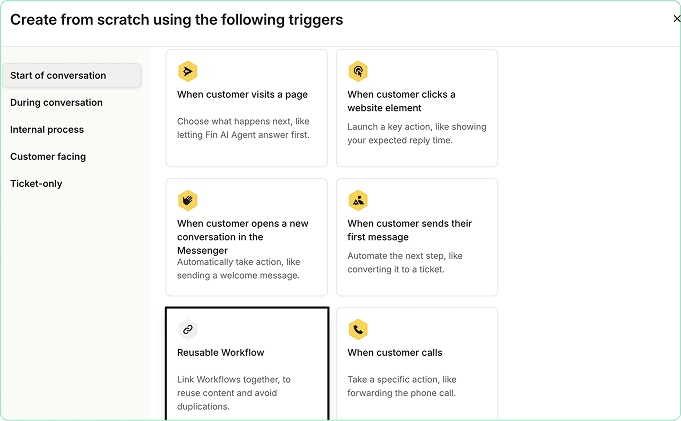
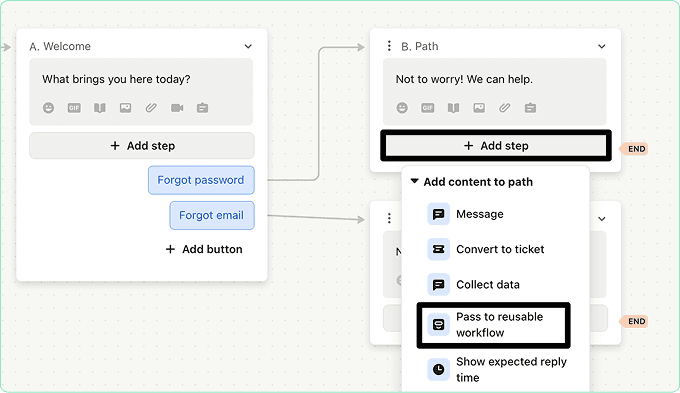
Reusable Workflows
If you find yourself using the same logic or blocks in multiple Workflows, like booking a demo or sending a pricing message, you can turn that section into a Reusable Workflow. This saves time and ensures consistency across your automation.
You can connect one Workflow to another and manage updates from one place, making scaling much easier.
Why Intercom Works for All Businesses
Intercom is used by both startups and large businesses to enhance conversations:
Startups: With tight budgets and small teams, startups benefit from Intercom’s automation and live chat features. These tools help them achieve more with fewer resources, all on a single platform.
Large Businesses: For larger companies, managing numerous conversations without losing a personal touch is critical. With FIN AI and automated bots, your team can maintain high-quality support while staying organized.
The future of customer communication is all about efficiency and speed. Intercom offers an all-in-one platform that suits businesses of any size.
The result? Happier customers, more productive teams, and a support platform that grows with your business.
Benefits of Intercom
Here’s what businesses get when they use Intercom:
Increased customer satisfaction: Your customers are left happy with quicker and more accurate answers. Personalized engagement:
With targeted messages and personalized responses, your customers feel both seen and understood, just like you’re directly speaking to them.
Scalable support: Intercom is built to grow with the scale of your business without losing out on accuracy and reliability.
Conclusion
At the end of the day, customer expectations are only going to go up and it’s easy to fall behind. With the right tools and technology, you can get ahead of the curve.
Intercom provides everything to help you do just that. By handing you all the necessary tools, you can save time, reduce team pressure, and create smoother workflows.
With FIN AI for quick answers, a modern helpdesk for communication, and various tools to optimize your support, you get a solid platform that meets your needs. Regardless of your business type or size, Intercom can adjust to fit your requirements.
At Dtech Systems, we specialize in helping businesses integrate and maximize platforms like Intercom. Whether you’re looking to improve customer engagement, automate support workflows, or set up a multilingual help center — our team can guide you every step of the way.
We don’t just implement tools — we tailor them to your business goals, train your team, and ensure you’re getting real results.
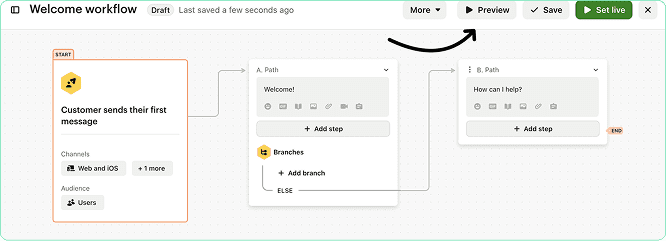
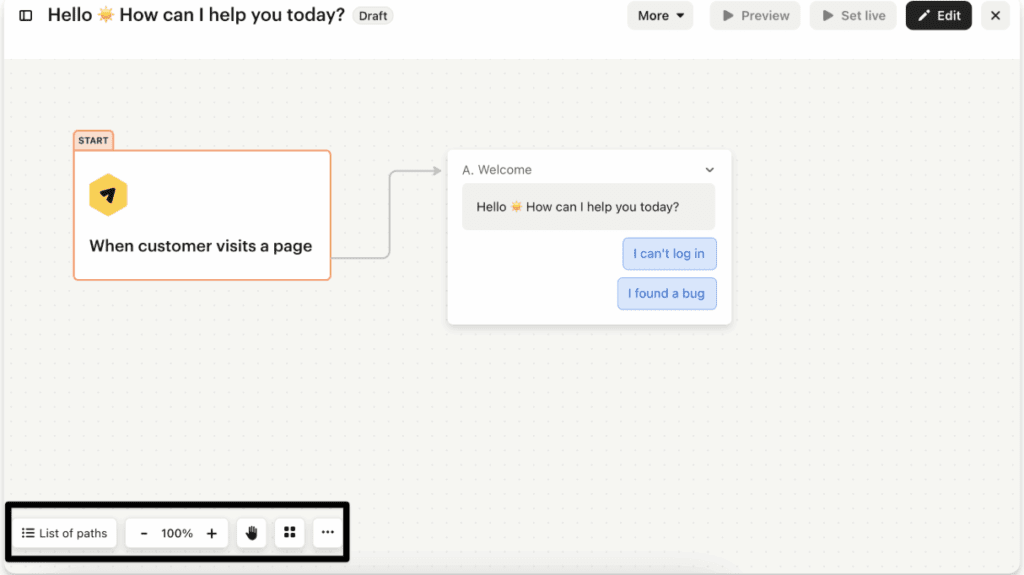
Intercom Workflows are visual, no-code automation flows that let you manage how conversations unfold with customers. Whether someone is visiting your pricing page, signing up for the first time, or coming back after a long break, Workflows help you respond with the right message, at the right time, automatically.
You can use Workflows to:
Answer FAQs instantly using bots or Fin AI
Collect user data and qualify leads
Route conversations to the right team or agent
Automate follow-ups, ticket creation, tagging, or snoozing
Engage users via Messenger, Email, WhatsApp, or SMS
They’re a complete toolkit to streamline communication across your customer lifecycle without any manual effort.
Why Use Workflows vs. Basic Chatbots?
Basic chatbots are limited to answering preset questions and may not handle complexity well. Intercom Workflows, on the other hand, are dynamic, multi-step journeys that adapt based on each user’s behavior or responses.
For example, while a chatbot might simply reply with an article when someone types “pricing,” a Workflow can:
Ask the user what they’re looking for
Check if they’re a new or returning visitor
Show relevant pricing tiers or connect them to sales
Automatically tag and follow up
This difference allows Workflows to not just respond but guide users, collect data, and drive action.
How to Build a Workflow
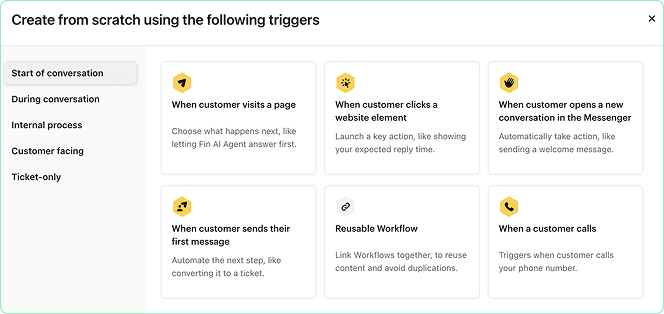
Step 1: Choose a Trigger
Decide when the Workflow should start, this could be when a visitor lands on a page, opens Messenger, sends a message, or is inactive for a period.
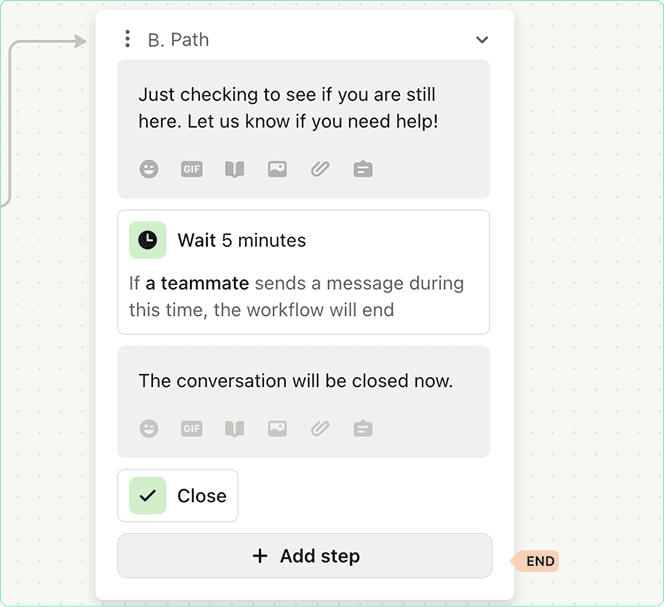
Step 2: Add a Message or Question
Introduce your bot message, Fin AI response, or a question with multiple choice replies. Make sure the message is friendly and relevant to the user’s intent.
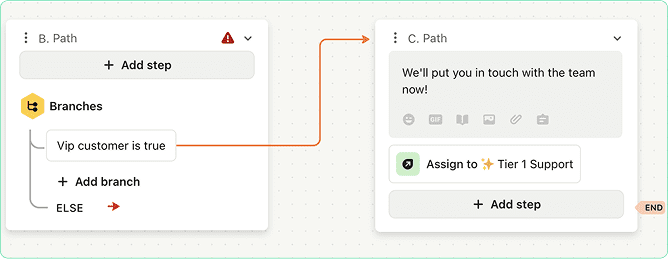
Step 3: Add Conditions or Branches
Use conditions to personalize the path. For instance, if a user selects “Talk to Sales,” route them differently than someone looking for support.
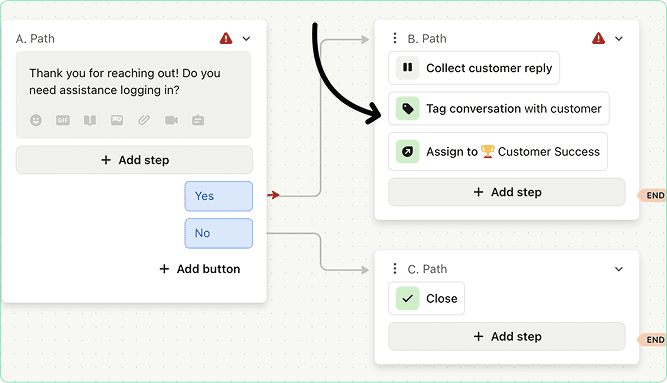
Step 4: Set Actions
Add background actions like tagging the user, assigning to an agent, creating a ticket, or sending an email follow-up.
Step 5: Preview and Launch
Use Intercom’s built-in preview mode to test all paths. Once everything looks good, publish the Workflow and monitor performance.
How Dtech Systems Can Help You Set Up and Scale ClickUp
While connecting Outlook Calendar is a quick task for individuals, deploying it at scale across departments requires a structured approach. This is where Dtech Systems can help. We are the only verified ClickUp partner in Saudi Arabia. Our consultants have deep expertise in:
ClickUp onboarding and full workspace setup
Custom calendar integration workflows for large teams
Smart scheduling using ClickUp AI
Task-to-calendar automation and conflict resolution
Time management dashboards for leadership teams
Onboarding and support for Microsoft 365 environments
If your organization wants to improve productivity, centralize planning, and reduce manual scheduling, we offer tailored solutions to make that happen efficiently.
Contact Dtech Systems to learn how we can design, deploy, and optimize your ClickUp environment.
Best Practices for Optimizing Workflows
Keep messages short and clear:
Avoid long blocks of text, make it feel like a conversation.
Use clear naming conventions:
Organize your Workflows with names like “Support – New Ticket Bot” or “Sales – Demo Request”.
Leverage reusable components:
If you frequently ask the same questions or use the same actions, turn them into reusable Workflow blocks.
Set goals and track outcomes:
Define what success looks like (e.g., demo booked, issue resolved) and monitor completion rates.
Avoid over-automation:
Not every task should be automated. Use human handoff where necessary to keep the experience personal.
Reusable Workflows
If you find yourself using the same logic or blocks in multiple Workflows, like booking a demo or sending a pricing message, you can turn that section into a Reusable Workflow. This saves time and ensures consistency across your automation.
You can connect one Workflow to another and manage updates from one place, making scaling much easier.
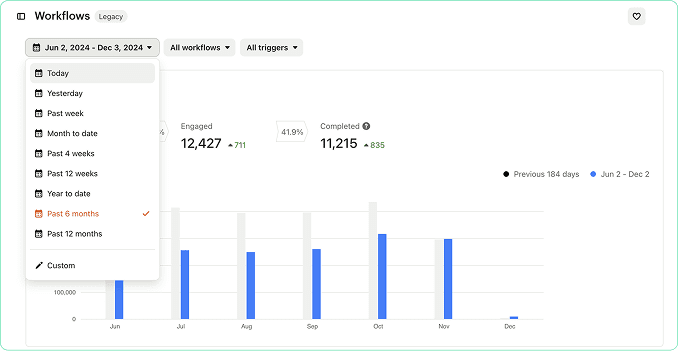
Workflow Reports
Intercom provides detailed reporting on Workflow performance.
You can track:
Completion rates
Drop-off points
Goal conversion
Message engagement
These insights help you optimize your flows, test what works, and make data-driven improvements to increase conversions.
Multilingual Workflows
If your audience spans multiple regions, you can create multilingual Workflows that automatically show the right language based on the user’s settings or browser preferences.
This ensures a seamless experience for all users whether they speak English, Arabic, French, or any other language.
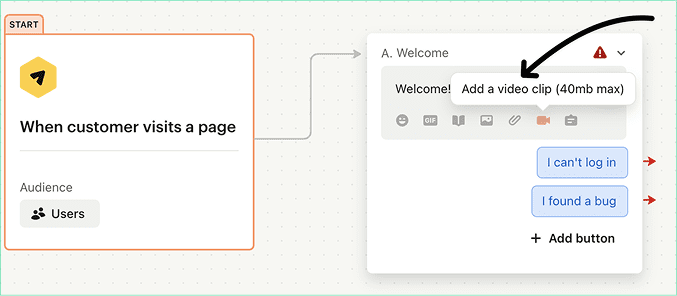
Add Videos to Workflows
To make your Workflows more engaging, you can embed short videos directly into messages. Use this to:
Explain complex features
Walk through onboarding steps
Add a personal touch with a recorded intro
Videos help increase engagement and improve comprehension especially during onboarding or support flows.
Wrap-Up: Smarter Conversations, Better Results
Workflows are more than just automation, they’re how you scale customer conversations without compromising experience. Whether you’re qualifying leads, answering questions, or guiding users to the right resources, Intercom Workflows help you do it faster and better.
If you’re ready to turn support into conversions, now’s the time to start designing your first Workflow.
Customer service has come a long way. It’s no longer just about answering questions or solving problems. In 2025, it’s about creating fast, helpful, and personal experiences that make customers feel truly cared for. Intercom is leading the way in this space. It’s a platform built to help businesses support their customers better, faster, and smarter.
Let’s take a look at some of the biggest trends in customer service this year and how Intercom is helping businesses keep up.
AI is Changing Everything
One of the biggest changes in customer service is the rise of AI. People want answers quickly, and support teams want to save time. Enter Fin, Intercom’s AI bot:
Fin can answer common questions in seconds.
It’s available 24/7, even when your team is offline.
It understands what customers are asking and gives helpful replies.
It knows when to pass the conversation to a real person.
This means your support team can spend more time helping with complex issues while Fin handles the simple stuff in the background.
Smart Automation Makes Life Easier
No one likes to repeat themselves or be passed from one support agent to another. Intercom makes this easier by letting you build smart workflows, without writing any code. These workflows guide customers to the right help based on their questions. Every request goes directly to the right person on your team. You can even create different paths depending on the customer’s plan or where they’re located. It saves time, reduces confusion, and makes the whole experience smooth and professional.
Helping Before There’s a Problem
Instead of waiting for customers to ask for help, smart companies are starting to reach out first. Intercom makes it easy to send helpful messages, product updates, or quick tips before a customer even needs to ask.
You can show tooltips inside your app:
Send friendly reminders to complete setup.
Let users know about new features.
Share guides right when someone needs them.
This kind of support feels more helpful and builds stronger relationships with your users.
Personal Support at Scale
Customers want to feel like you truly know them — and with Intercom, delivering that personal touch is possible even at scale. By connecting seamlessly with your CRM and other tools, Intercom gives your team instant access to each user’s past activity, message history, and relevant context. This means you can craft replies that are tailored to every customer’s exact situation, not just generic responses. It also helps you identify which users need attention the most, so even a small support team can prioritize effectively and make every customer feel valued.
Everything in One Place
People contact support in different ways through email, chat, social media, and more. Intercom brings all of those conversations into one place so your team can respond faster with the full picture.
Your team sees everything in one inbox.
They can leave notes for each other.
It’s easy to jump in and take over when needed.
The result is better replies and happier customers.
Conclusion
Customer service in 2025 is all about speed, care, and smart tools. Intercom is helping businesses around the world deliver better support through automation, AI, and helpful features that save time and improve the customer experience.
Whether you’re running a growing startup or a big company, Intercom gives you what you need to stand out and take care of your users the right way.
Want to Get Started with Intercom?
At Dtech, we help businesses set up and get the most out of Intercom. From building workflows to setting up Fin and customizing your support experience, we’re here to help.
Let’s make your customer support smarter and more helpful than ever.
How Can Businesses Stay Available to Customers 24/7?
When customers land on your website with a question, they expect answers — fast. If they can’t find what they need quickly, they’ll move on.
Staying connected with customers isn’t always easy. Whether it’s answering their questions or pointing them in the right direction, even small delays can lead to frustration and lost customers.
Consistent communication is key to any healthy relationship, including the one you have with your customers. When people feel ignored, they won’t stick around for long. That’s exactly the kind of gap Intercom is designed to fill.
If staying connected to your customers feels like a challenge, this article will introduce you to Intercom, a tool that helps make communication effortless for both customers and teams through smart features and AI support.
Intercom in Action
1. What the Customer Sees
Picture this: you’re shopping on an e-commerce site, trying to buy a piece of clothing. You’ve searched every page but still can’t find the price. After going around in circles for what feels like forever, you simply give up and leave.
Now imagine the same scenario with Intercom. You spot the small chat icon in the corner of the page and click it. A simple pop-up appears, maybe with a chatbot, some company highlights, or even links to helpful articles. You type in your question about the price, and the chatbot responds within seconds.
No more digging. No more frustration. Just a quick, straightforward answer.
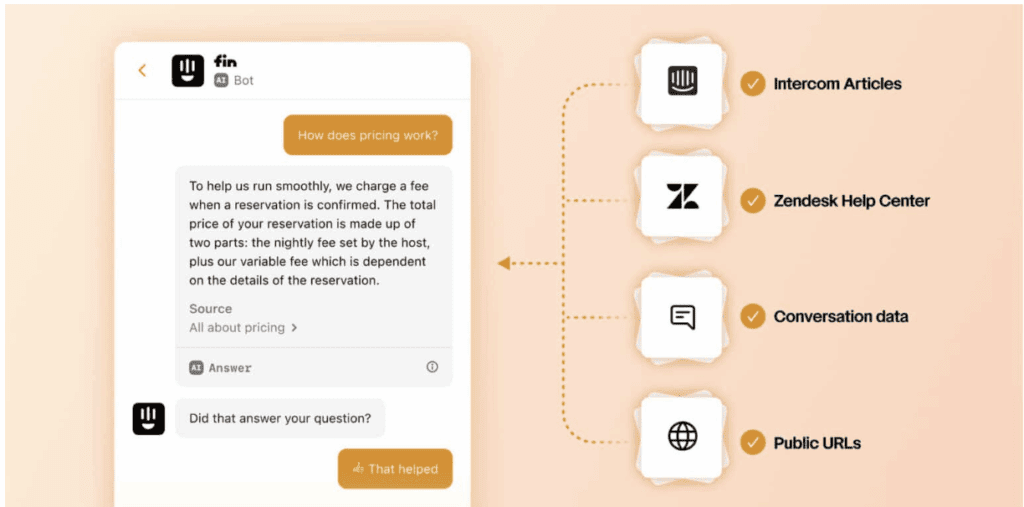
And here’s the best part: Intercom creates answers using content directly from the business’s Help Center and website. That means the answers are accurate, up-to-date, and written by the people who know the product best. Now, reliable information is just a click away, and your support team is free to tackle more complex questions.
2. How Responses are Formed
When someone asks a question through Intercom, they get a response from one of two sources: a bot or a human agent.
Most everyday questions are handled instantly by bots. These bots don’t create answers out of nowhere. They pull them directly from your company’s Help Center, using articles your team has already written. This helps customers get accurate answers quickly. And your support team doesn’t have to repeat the same responses over and over again.
For example, if a customer asks, “How can I track my order?” the bot directs them to the right place using existing information, without needing human help.
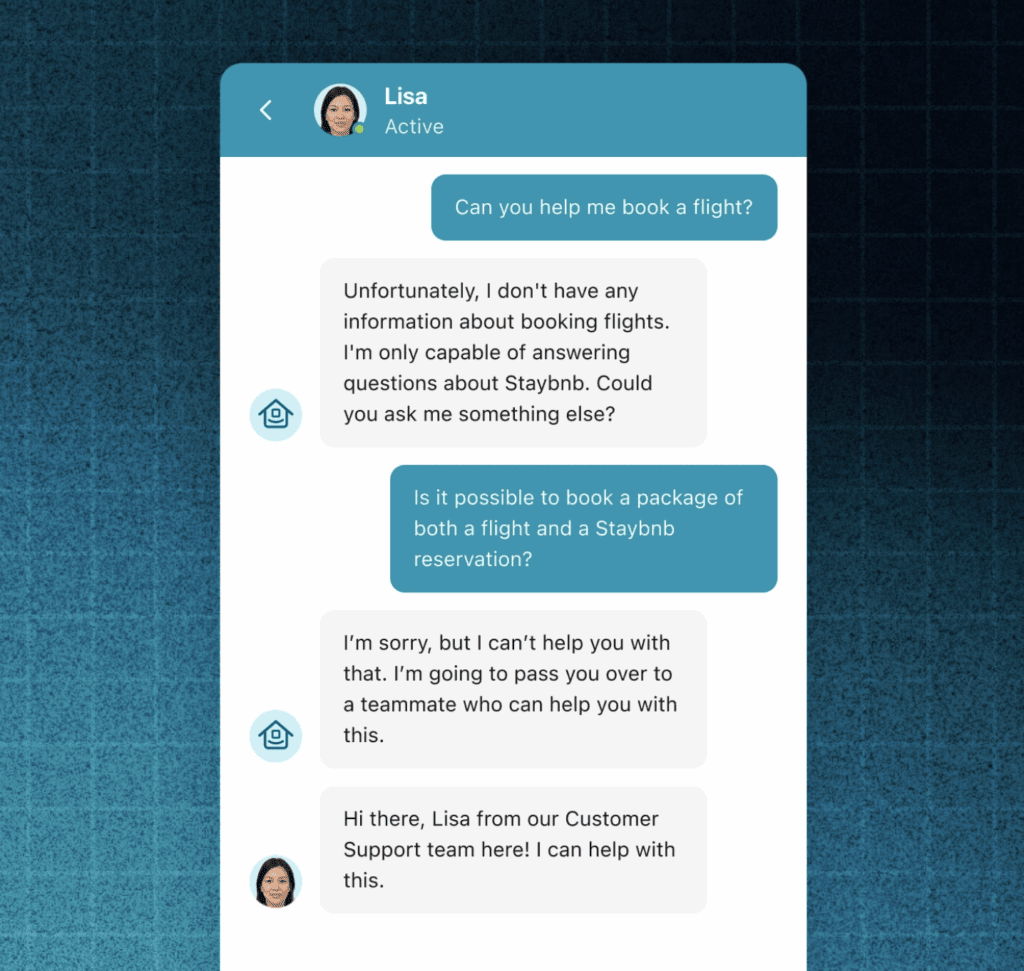
But Intercom knows that some questions aren’t easy to answer. That’s why they’ve set up a smooth system of handing over tougher conversations to human agents when needed. Agents can pick up the conversation with all its history, so they can jump in without customers having to repeat themselves.
This balance between bots and human support ensures timely, helpful, and personal assistance, no matter how difficult the question.
3. What’s Powering it All
Behind the scenes, Intercom runs on a mix of smart technology and helpful tools. It combines messaging, automation, and a bit of AI to make conversations smooth, even if it’s a mix of bot and human interaction.
Tools like the Inbox help your team stay on top of messages, Fin (an AI assistant)gives fast responses, and Workflows make sure every conversation goes to the right place.
It’s all like one well-oiled machine where each tool plays a part in keeping communication smooth and consistent.
4. Use Cases of Intercom
Intercom can be used in all kinds of settings where clear and reliable communication matters.
It can be used for:
Answering Customer Questions (Fast):
A customer visits an online store and wants to know their shipping information. They open the Intercom chat, type their question, and get an instant answer taken from existing information.
Guiding New Visitors:
A consultancy firm uses Intercom to greet new visitors with a friendly message and link them to recent case studies that show how they’ve helped other clients succeed.
Resolving Technical Issues
A customer is having trouble resetting their password, so they start a conversation. The Intercom bot steps in to help and, if needed, smoothly hands the conversation over to a human agent for further support.
Turn Intercom into Your Best Support Tool with Help from Dtech Systems
Intercom is powerful, but it works best when it’s set up just right for your business.
At Dtech Systems, we help teams make the most of Intercom without the tech stress. Whether you’re just getting started or want to improve how things run, we’re here to guide you every step of the way. We don’t just set things up, we shape Intercom to fit your goals, train your team to use it with confidence, and make sure it’s actually working for you.
Book a free consultation with Dtech Systems and see how simple great communication can be.