The pattern is familiar by now: a team pilots a chatbot, a summarization tool, an AI writing assistant. Adoption is high for two weeks. Then it quietly stops getting used, because it was bolted onto a process that was broken to begin with. Six months later, leadership is asking why the AI budget didn't move any real numbers.
The tools aren't the problem. The targeting is. Here's how to find AI use cases that deliver ROI — and why the search has to start in your workflows, not in a vendor demo.
The data backs this up: McKinsey's 2025 State of AI research found that while most organizations now use AI regularly, they haven't embedded it deeply enough into their workflows to see enterprise-level financial impact. Adoption isn't the bottleneck. Targeting the right AI use cases is.
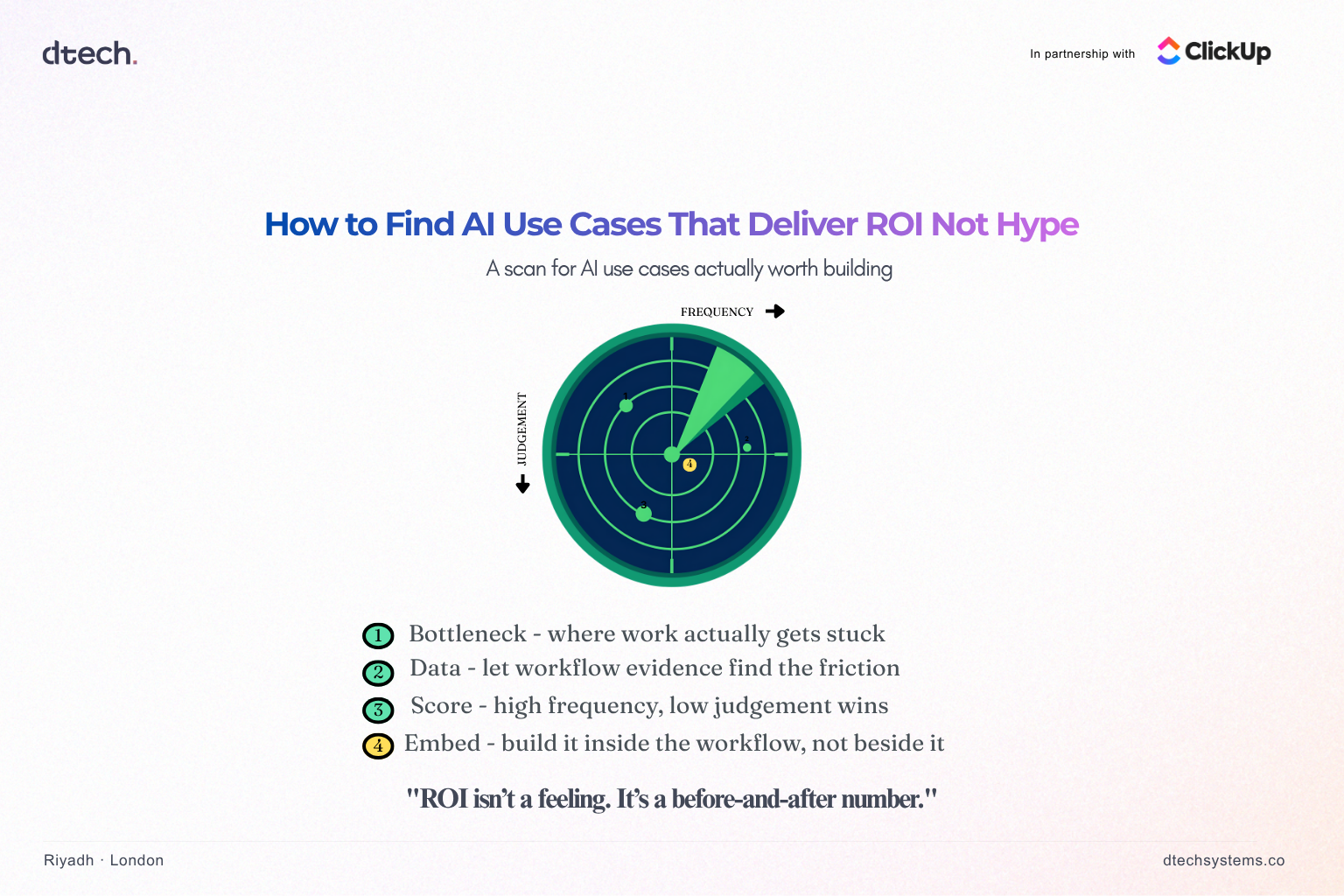
Start with the bottleneck, not the buzzword
The teams that get real ROI from AI don't start by asking "where can we use AI?" They start by asking "where does work actually get stuck?"
That's a different question, and it points to different answers:
Every one of those is a bottleneck with a paper trail — and that paper trail is usually sitting inside your project management data, not in a stakeholder's gut feeling.
Use your existing workflow data, not assumptions
TThis is where most AI strategy work goes wrong: it's based on assumptions about where time is lost, not evidence. Every credible list of AI use cases that deliver ROI starts the same way — with data, not a brainstorm.
If your work already lives in ClickUp, you don't have to guess. You have the evidence:
If your work already lives in ClickUp, you don't have to guess. You have the evidence:
→ Time in status shows exactly which stage of a workflow tasks get stuck in, and for how long.
→ Custom field and tag data shows which categories of work recur often enough to be worth automating.
→ Task and comment volume shows where coordination overhead — not the work itself — is eating the most hours.
→ Dashboards turn that into a picture leadership can actually act on, instead of a hunch someone raises in a meeting.
An AI use case backed by this kind of data has a baseline built in. You know the current cost in hours or delay before you touch anything, which means you can measure the improvement afterward instead of asserting it.
For more on turning workflow data into a starting point instead of a guess, see our post on why your company doesn't need more AI tools, it needs better workflows.
How to score AI use cases that deliver ROI
Once you have a shortlist of bottlenecks, not every one deserves an AI solution. Score candidates on two axes:
Frequency — how often does this happen? A once-a-quarter report doesn't justify automation the way a daily triage task does.
Friction — how much judgment does this actually require? High-frequency, low-judgment work (sorting, tagging, drafting first passes, summarizing) is where AI earns its keep fastest. High-judgment work (a client negotiation, a strategic call) is usually a worse first bet, even if it looks more impressive in a pitch deck.
The use cases that clear both bars — high frequency, low judgment — are where teams see ROI in weeks, not quarters.
Build the use case inside the workflow, not next to it
This is the step that determines whether a use case survives past its pilot. AI that lives in a separate tab, outside the system where the work already happens, adds a step instead of removing one. People stop using it the moment the novelty wears off.
AI that's embedded directly into the workflow — inside the task, the doc, the automation that's already running — doesn't ask anyone to change their behavior. It just makes the existing behavior faster.
That's the practical case for tools like ClickUp Brain and ClickUp's autonomous Autopilot Agents: they don't sit outside the work, they sit inside it. An agent that triages incoming requests, drafts a first-pass response, or moves a task forward based on a status change is acting inside the same system your team already lives in — no new tool to adopt, no new habit to build.
Measure it like you'd measure any other investment
ROI isn't a feeling of "this seems faster." It's a before-and-after number, tied to something the business already cares about — the same discipline that separates AI use cases that deliver ROI from ones that just look impressive in a slide:
→ Hours reclaimed per week, multiplied by loaded cost
→ Cycle time from request to resolution, before and after
→ Error or rework rate on the automated step
→ Throughput — how much more volume the same team can now handle
If you pulled your baseline from workflow data in the first place, this step is just running the same report again three months later. That's the whole advantage of starting with evidence instead of enthusiasm.
The short version
AI use cases that deliver ROI aren't found by chasing the newest model release. They're found by looking at where your team's time is actually going, picking the bottlenecks that are frequent and low-judgment, and embedding the fix into the workflow that already exists — instead of adding a new one.
Start with the data you already have. The AI use case that delivers the most ROI in your organization is probably already visible in your workflow — it's just been mistaken for "how things have always worked." That's the whole game: finding AI use cases that deliver ROI is a data exercise, not a creativity exercise."