Claude x ClickUp is one of those integrations that sounds like a nice-to-have until you’ve felt the pain it solves. I want to start with a confession. For months, I was running two browser windows side by side: Claude in one tab, ClickUp in the other. I’d prompt Claude, get a solid response, highlight it, Ctrl+C, Alt+Tab, Ctrl+V into a ClickUp Doc, then manually decompose that output into tasks, set statuses, assign owners, estimate story points. Rinse and repeat, every single sprint.
That workflow had a name: context switching. And context switching, even when it feels productive, is one of the most expensive hidden costs in software development. Every tab flip is a cognitive context flush. You lose the thread. You re-read. You re-orient. Studies on developer productivity put the cost of a single unplanned interruption at 20-plus minutes of recovery time. Multiply that by how many times you’re bridging your AI tool and your project management system per day, and the number gets uncomfortable fast.
The Claude x ClickUp integration doesn’t just save clicks. It eliminates an architectural flaw in how most tech teams use AI: treating it as a standalone tool rather than an embedded reasoning layer inside the system where work actually lives.
“The best AI tools don’t replace human judgment — they eliminate the cognitive overhead that gets in the way of it.”
The Core Problem: Stateless AI in a Stateful Work Environment
What the MCP integration actually does under the hood
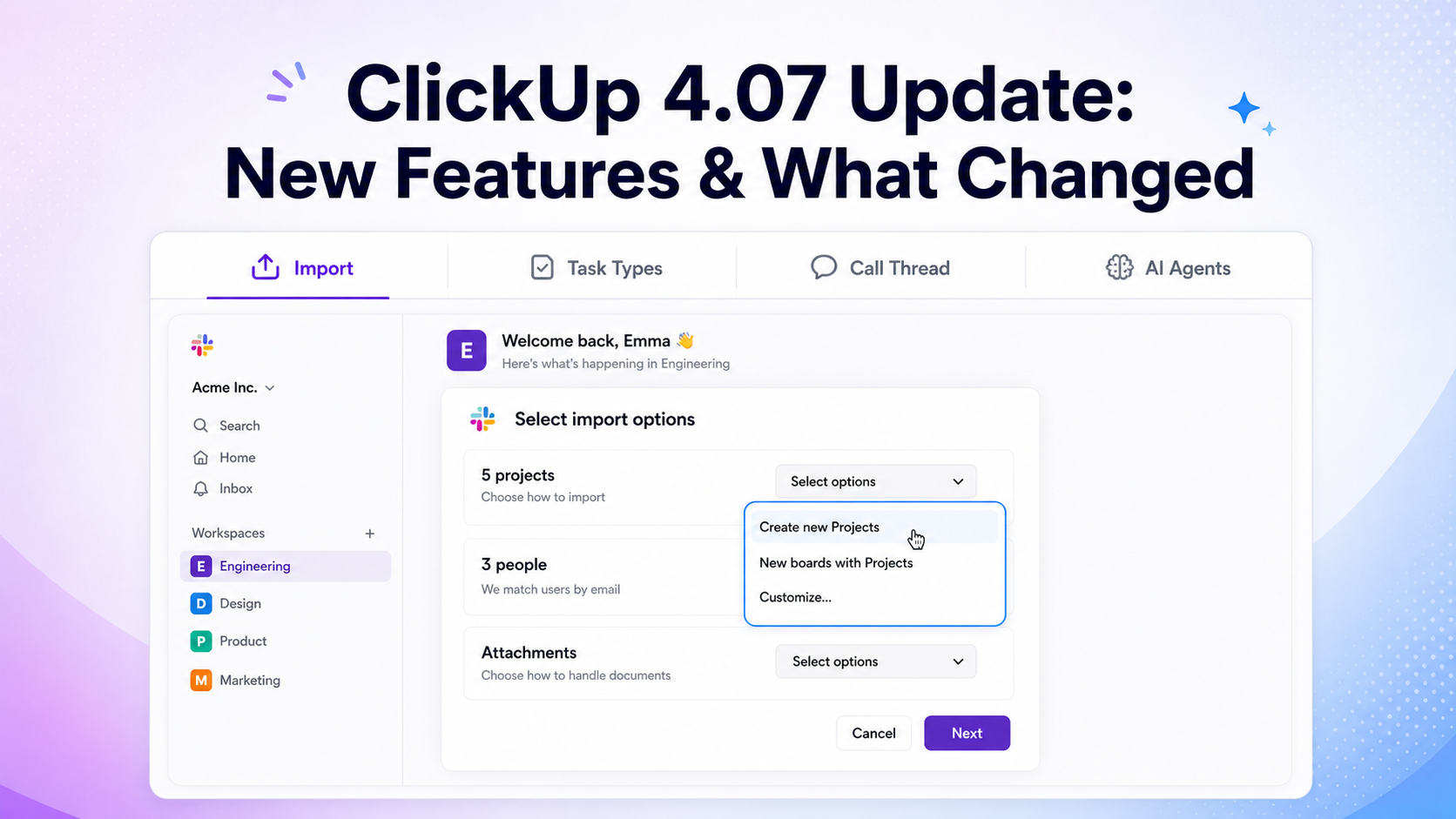
The Model Context Protocol is Anthropic’s open standard for connecting LLMs to external data sources and tools in a structured, permission-aware way. Think of it as a typed API contract between Claude and whatever system it’s plugged into. ClickUp’s MCP server exposes a defined set of operations: reading tasks, creating and updating tasks, querying lists and spaces, retrieving custom field definitions, and triggering automations.
When you interact with Claude inside ClickUp, your prompt gets routed through this MCP layer. Claude receives not just your text input but a structured representation of the relevant workspace context: task titles, descriptions, statuses, assignees, due dates, and relationships. It reasons over that combined input and returns outputs that are grounded in your actual data, not hallucinated from general knowledge.
This is a meaningful architectural shift from RAG-style integrations (Retrieval-Augmented Generation), where a separate retrieval step pulls potentially relevant documents and stuffs them into the prompt. MCP is tighter than that — it’s a live, structured interface rather than a fuzzy semantic search over workspace content. The result is more reliable, more precise, and less prone to the context pollution that makes RAG outputs feel slightly off.
We’ve covered the setup itself in more detail in how we’re integrating Claude into our ClickUp workflows at Dtech Systems, if you want the step-by-step version before diving into the results below.
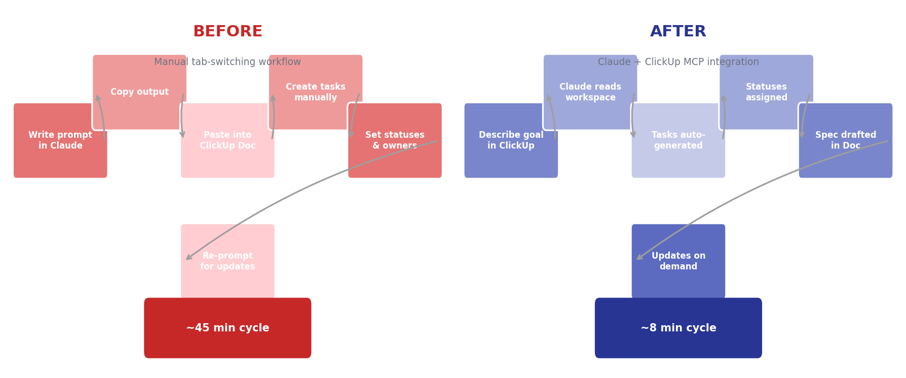
Fig. 1 — Before: 45-minute manual cycle per sprint loop. After: 8-minute integrated cycle with Claude reading live workspace state
Where Claude x ClickUp actually changed how we work
Enough architecture. Here’s what it looks like when your team is actually using it.
Sprint planning with real backlog awareness
Our sprint planning sessions used to involve a product manager reading task titles aloud while the engineering team estimated in Planning Poker. Painfully manual, and the estimates were often shaky because not everyone had read every task description beforehand.
Now, before we get into the room, I ask Claude to analyze the candidate backlog against our sprint goal and our team’s historical velocity. It flags underspecified tasks (missing acceptance criteria, no assigned owner, unresolved dependencies), surfaces tasks that are likely underestimated based on their scope description, and generates a recommended pull list with a rationale for each item. We walk into planning with a pre-processed backlog. The conversation shifts from “what is this task even asking for” to “do we agree with this prioritization.” That’s a fundamentally higher-quality use of the team’s time.
Automated spec generation from product briefs
One of the most painful handoffs in any tech team is the translation from product requirement to engineering specification. A PM writes a user story. An engineer reads it and has eight questions. The PM answers them. The engineer writes a spec. The PM reads it and realizes three things got lost in translation. This loop can eat a week before a single line of code gets written.
With Claude embedded in ClickUp Docs, a PM can paste a one-paragraph feature brief and ask Claude to expand it into a full technical spec. The output includes: user stories with clear actors and outcomes, functional requirements broken down by component, non-functional requirements (latency targets, error handling expectations, edge cases), and open questions flagged for engineering review. It’s not a finished spec — it’s a 70% draft that cuts the back-and-forth loops from five rounds to two. The PM and engineer spend their time refining, not bootstrapping.
Intelligent bug triage and routing
Bug triage is one of those engineering team functions that sounds straightforward and is actually really hard. You’re making rapid severity assessments, often with incomplete reproduction steps, while also trying to route issues to the right engineer without creating queue imbalances.
Claude can now sit at the front of that triage queue. When a bug ticket lands, it analyzes the description, compares it against open tasks to detect duplicates, assesses severity based on your team’s custom severity criteria (which live in ClickUp custom fields), and suggests an assignee based on component ownership. It’s not autonomous — every decision still goes through a human — but it compresses a 15-minute triage decision into a 2-minute review and approval. For a team shipping fast, that adds up.
Status reporting without the manual aggregation
Here’s a workflow that I genuinely dreaded: the Friday status report. Pulling data from 30+ tasks across multiple lists, synthesizing what actually moved versus what just had a comment added, formatting it for an audience that doesn’t live in ClickUp all day. It was a 45-minute exercise in tedium.
Now I ask Claude to generate the report. It reads task statuses, completion deltas since last week, active blockers, and upcoming due dates. It formats the output as a stakeholder update — plain-language narrative, not a data dump — and flags items that need executive attention. I review it, make adjustments, send it. Fifteen minutes total, and the quality is higher because Claude doesn’t skip the boring but important details the way I would when I’m tired on a Friday afternoon.
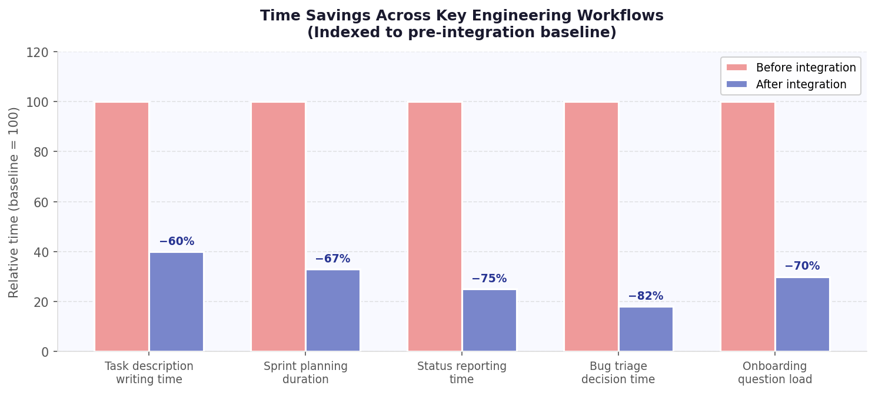
Fig. 2 — Time savings across five key engineering workflows, indexed to pre-integration baseline. Triage and reporting show the steepest gains
The technical qualities that make Claude the right fit
Not every LLM would work well in this context. A few specific properties make Claude particularly suited to project management integration:
-
- Long context window: Claude can hold large workspace contexts — multiple tasks, Docs, and comment threads — without losing coherence. This matters when your sprint has 40 tasks and you want analysis across all of them, not just the first few.
-
- Structured output reliability: Claude consistently returns well-formed, parseable responses when asked to generate structured data (task lists, specs, priority rankings). This is critical for downstream automation — if the output format is unpredictable, you can’t build reliable workflows on top of it.
-
- Constitutional AI alignment: Claude is trained to surface honest assessments rather than agreeable ones. When I ask it whether our release timeline is realistic, it tells me the truth based on the data — not what I want to hear. That’s the behavior you want from a tool that’s informing decisions with real consequences.
-
- Low hallucination rate on grounded tasks: because Claude reasons over actual workspace data (not parametric memory), the hallucination risk drops significantly. It’s not inventing task details — it’s analyzing ones that exist.
The limitations you should know going in
I want to be direct about where this integration has edges, because overselling it would waste your time.
First: garbage in, garbage out still applies. Claude’s output quality is a direct function of your workspace data quality. Vague task descriptions, missing custom fields, and inconsistent status usage will produce vague, inconsistent AI outputs. If your ClickUp hygiene is poor, the integration will surface that problem more visibly — which is actually useful information, but it’s not a magic fix.
Second: the MCP integration is read-heavy right now. Claude can read and analyze your workspace extensively, and it can create and update tasks. But complex multi-step automations — the kind that involve conditional logic across multiple spaces with external webhook triggers — still require manual setup. The conversational automation interface is genuinely useful for standard patterns, but it has limits at the edges of ClickUp’s automation engine.
Third: Claude operates within the boundaries of what’s documented in your workspace. Tribal knowledge — the architectural decisions that live in Slack threads and people’s heads, not in ClickUp Docs — is invisible to it. If your team’s context is mostly undocumented, you’ll see that gap reflected in Claude’s outputs. The integration is a strong incentive to document better, but it won’t do the documenting for you.
“Claude is a reasoning engine, not an oracle. It works from evidence. If the evidence is thin, the reasoning will be too.”
What this signals about where AI in dev tooling is going
Stepping back: the Claude x ClickUp integration is an early but clear example of a broader shift in how AI is being deployed in engineering and product organizations. The first wave of AI tooling in tech was about individual productivity — Copilot for code completion, ChatGPT for drafting, Claude for research. Useful, but fundamentally individual.
The second wave, which we’re entering now, is about systemic integration. AI as a reasoning layer embedded in the tools that orchestrate how teams coordinate — project management, documentation, CI/CD pipelines, incident management. The value isn’t in any single AI interaction; it’s in the compounding effect of AI having persistent access to organizational context and being able to apply that context consistently across the entire workflow.
What that means practically: teams that invest now in clean data structures, well-documented processes, and thoughtful AI integration into their existing toolchains will have a significant operational advantage within 18 to 24 months. Not because AI will do their work for them, but because they’ll have eliminated the coordination and documentation overhead that currently consumes 30 to 40 percent of a typical engineering team’s week.
The Claude x ClickUp integration is one of the most mature versions of this pattern I’ve seen in a project management context. It’s not perfect — no v1 integration is — but the architectural approach is right, the AI quality is high, and the workflow improvements are real.
If your team is already on ClickUp, connecting the Claude x ClickUp MCP integration takes under ten minutes. Run one sprint with it. Measure the planning time, the spec turnaround, the triage throughput. Let the data tell you whether it’s worth keeping. My bet is it will be.