DTECH INSIGHTS
Prepared by Dtech Systems. Reviewed 9 October 2026. Examples are proposed workflows.
ClickUp Artifacts: Turn AI Output Into Work Your Team Actually Uses
A useful AI deliverable starts with reliable information and a clear review process. Use this guide to choose one report, test its output and agree how your team will maintain it.
Recurring reports can involve collecting updates, checking figures and formatting the same information again. ClickUp Artifacts offer another way to prepare that deliverable. Start with one report whose source information and reviewer are already clear.
The aim of a pilot is to improve the whole reporting process: preparation, verification, review and distribution. Measure each part before deciding whether the new approach saves your team time.
Below we cover what ClickUp Artifacts are, what to build first for your role, how to create one, and the limits worth knowing before you roll it out to a team.
What Are ClickUp Artifacts?
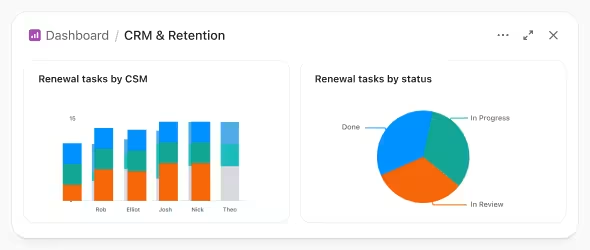
ClickUp describes Artifacts as AI-built deliverables such as decks, dashboards, reports and interactive tools. Brain or Super Agents can use prompts and Workspace information to create them. See ClickUp's Artifacts overview for product examples.
For your own report, identify the source Lists, fields and date range before generating anything. Check every important total against those sources. Workspace context is useful input; it is not a guarantee that every generated figure or statement is correct.
Assign an owner to the deliverable and keep the source brief with it. Record when the information was checked, who approved it and what changes are needed for the next reporting period.
What to Verify Before Sharing an Artifact
A polished layout is only one part of a useful report. Use these checks during your pilot.
| Area | Question | Suggested check |
|---|---|---|
| Source | QuestionWhich records and reporting period are included? | Suggested checkKeep a dated source brief with the report. |
| Accuracy | QuestionDo totals and statements match the source? | Suggested checkReconcile a sample and investigate differences. |
| Freshness | QuestionDoes the displayed information reflect the latest changes? | Suggested checkChange a test record and verify the result before promising live reporting. |
| Review | QuestionWho approves the next version? | Suggested checkName a reviewer and keep their acceptance checks. |
| Access | QuestionWho should be able to see the output? | Suggested checkTest the recipient's access before sharing. |
ClickUp documents comments and saved versions for Artifacts. Use those capabilities alongside a review process; a shared link alone does not prove that a report is current or approved.
Web publication can make an Artifact viewable by anyone with the link. Decide the audience first and remove material that should stay inside your team.
What to Build First: Pick Your Role
A practical starting point is one report you already prepare regularly. These proposed examples help you choose a small pilot; they are not Dtech client results.
Find your first Artifact
Weekly operations dashboard
A proposed summary of overdue tasks and blockers. Reconcile its counts with the source Lists.
Build a dashboard of overdue and blocked tasks in the Operations space, grouped by team.Gantt-style stakeholder update
Milestones, dates, and statuses turned into a clean timeline deck for steering meetings.
Turn the milestones in this List into a timeline presentation for our steering committee.Prospect-specific pitch deck
Company size, pain points, and use cases from Custom Fields, combined with your product brief Doc.
Create a pitch deck for this account using its Custom Fields and our product brief.Campaign one-pager or landing page
A proposed campaign summary from a brief and task List, for review before client approval or launch.
Make a one-page campaign overview from this List and brief, for client sign-off.Monthly executive report
Status, risks, and wins across projects, summarized into a branded HTML report.
Summarize this month's project status, risks, and completed milestones as an executive report.Interactive calculator or intake tool
A proposed internal calculator using agreed rates. Test its calculations; do not assume it submits data to an external CRM.
Build a simple project cost calculator using our standard rates from this Doc.Showing all six starting points. These are proposed pilot examples, not measured customer outcomes.
How to Pilot ClickUp Artifacts in 4 Steps
Use these four implementation steps for a controlled first trial.
- Choose the source. Name the report, its audience, date range and records. Remove unnecessary information and agree what a correct result looks like.
- Create a draft. Open Brain or the Artifacts page and describe the output. Point to the relevant source items. Ask the draft to identify missing information rather than fill it with invented figures.
- Check and refine. Compare the result with the records, review labels and test calculations. Update one test item to see how freshness works in your setup.
- Approve the audience. Choose the appropriate sharing route and verify access. Assign responsibility for the next update before using the report operationally.
Repeat the trial for a full reporting cycle. Compare preparation and review time with your current process, and keep the result only if it meets the agreed checks.
Art Kits: Reuse the Format After the Pilot
ClickUp's Art Kits let teams reuse an Artifact template with new data. Keep your reporting brief and acceptance checks alongside the template.
Proposed Saudi PMO use case: prepare a monthly project-status report with milestones, blockers and named action owners. Have a reviewer check dates, totals and any Arabic business terminology before the steering meeting. This is a proposed reporting workflow, not a compliance certification.
Proposed UK service-team use case: prepare a weekly client-delivery summary covering open work, risks and next actions. Check what each client is allowed to see and whether the report supports a useful decision. Neither example promises a particular time saving.
Limits Worth Knowing Before You Roll Out
Access and usage. Availability varies by plan and role. Creating or editing Artifacts consumes AI Credits. Confirm your Workspace's current access and usage before scaling the pilot.
External systems. ClickUp's documented Artifact sandbox blocks external network requests and externally loaded code. An interactive intake prototype is therefore not proof of CRM delivery. Work that needs a live external service requires a separately designed integration or hosted application.
Review still matters. Test source coverage, dates, calculations and permissions. A generated report should go through the same acceptance checks as other business reporting.
Sources checked 9 October 2026: ClickUp Artifact creation, sharing and limits; ClickUp AI usage tracking.
Is Your Workspace Ready for ClickUp Artifacts?
Tick what is true for your proposed pilot. This is Dtech's self-check, not a validated score or ClickUp certification. It does not send your answers to Dtech.
Artifacts readiness check
0 / 100
Tick the statements above to review your pilot checklist.
Use unchecked items to decide what to fix before the trial. Then run a small pilot with a named reviewer. The checklist does not establish accuracy, security, readiness for production or expected savings.
ClickUp Artifacts FAQ
Are ClickUp Artifacts available on every plan?
Availability and limits vary by plan and role. Confirm access in your own Workspace.
Do ClickUp Artifacts update when my data changes?
Test freshness for your specific Artifact and source. Check the reporting period and regenerate or revise the output when needed. Do not assume every external system updates automatically.
Can people outside my workspace view an Artifact?
Web publication allows anyone with the link to view it. Review the audience and content first.
Should I choose ClickUp, Claude or ChatGPT for this report?
Compare the actual workflow: source access, review, sharing, output quality and cost. Run the same small reporting task in the tools you already use rather than relying on blanket claims about a whole product.
Why did part of my Artifact not load?
Check whether it depends on external code or a network request, which the Artifact sandbox blocks. Review the error and ask for a supported alternative; test it again.
Dtech Systems helps teams in Saudi Arabia and the UK structure ClickUp workspaces, review reporting needs and plan AI workflow pilots. Bring one recurring report and its current process. Book a Free Workspace Audit to discuss the sources, review steps and implementation scope.